


Inspiring
June 12, 2025
Answered

Default Copies in Print Dialog

  • June 12, 2025
  • 2 replies
  • 291 views

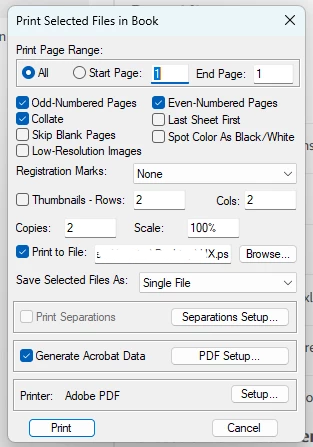
I have about 20 different Framemaker books I manage. One of them is defaulting to 2 copies in the print dialog, the rest are set at 1. For this particular book, it creates 2 sets of every chapter (i.e., 2 covers, 2 preface, 2 introduction, and so on). 

In other words, in just this document - Copies defaults to 2. In all my other books, default is 1. I've also checked my printer dialog and it's default is 1.

I create .ps files, then use Adobe distiller to create .pdfs.
 

    Correct answer Winfried Reng

    Hi,

    I checked your issue, and it seems that the number of copies (and probably also other settings) is a book property.

    When I have a new book, the default number of copies is always 1.

    When I set this to 2 and print the book, close it and open this book again, the number of copies is 1 again.

    When I set this to 2 and print the book, make a change in the book, save it and close it and open this book again, the number of copies is still 2!

    Therefore, change the number of copies in your book to 1, make a change in the book (e.g. update), then save. Now the number of copies should be 1 again.

    Best regards, Winfried


    2 replies

    Community Expert
    June 13, 2025

    By the way, you can also use the Save as PDF command.

    Without changes in the sts PDF settings in the Publish pod, FrameMaker uses the FrameMaker PDF engine.

    When you still want to use the Distiller, open the sts file in the Publish pod and activate Use Acrobat Distiller for PDF Generation. You can also use PostScript frames with this setting.

    In any case Save As PDF is faster, less keystrokes than printing a book to a PostScript file and distill it.

    Winfried RengCommunity ExpertCorrect answer
    Community Expert
    June 13, 2025

    Hi,

    I checked your issue, and it seems that the number of copies (and probably also other settings) is a book property.

    When I have a new book, the default number of copies is always 1.

    When I set this to 2 and print the book, close it and open this book again, the number of copies is 1 again.

    When I set this to 2 and print the book, make a change in the book, save it and close it and open this book again, the number of copies is still 2!

    Therefore, change the number of copies in your book to 1, make a change in the book (e.g. update), then save. Now the number of copies should be 1 again.

    Best regards, Winfried


    Inspiring
    June 13, 2025

    This worked! Thank you very much.