
Legend
April 14, 2021
Question

<Default ¶ Font> in variables

  • April 14, 2021
  • 5 replies
  • 596 views

Going back to a manual I haven't touched for a few years, and suddenly I see a problem. I suspect it may have arrived when I globally updated styles in line with new corporate guidelines, but that doesn't immediately help me correct it.

Consider the screenshot:
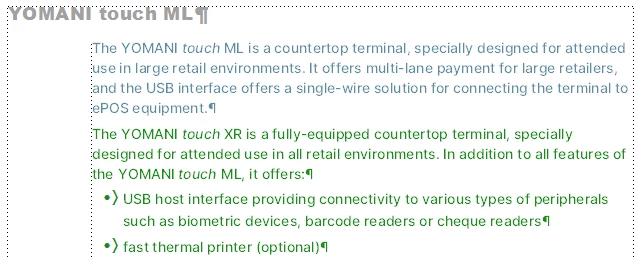
All four occurrences of the product name YOMANI touch use the same variable, defined as 

<Default ¶ Font>YOMANI <!italic>touch<Default ¶ Font> – but the string touch is not rendered as italic in the top-level heading. I'm wondering whether I need to adjust the definition of the character style !italic, but don't know what I might need to change.

I'm out of office tomorrow and Friday, so don't think I'm ignoring any swift replies ;-}

This topic has been closed for replies.

5 replies

Legend
April 21, 2021

Thanks, Barb: I'll try that first thing … next week: currently trying to get through more of today's planned tasks each time the cable company opens a window of opportunity ;-} 

Barb Binder
Community Expert
Community Expert
April 20, 2021

@FieryPantone:


Your character style looks perfect. Are you saying that changing the Title font family from Arial Black to Inter in the Paragraph Designer still doesn't assign the italics? If so, try removing the variable and adding it back in, after you change the font. 


~Barb 

~Barb at Rocky Mountain Training
Legend
April 20, 2021

Lots of useful information …

So, I now see that Arial Black doesn't have an italic variant. But I also see that while vanilla Arial does have an italic variant, changing the font for the title still doesn't deliver the required result.

Here's an overview of the settings in play:

Barb Binder
Community Expert
Community Expert
April 20, 2021

Hi @FieryPantone:


I'm guessing it is font related.

  • What font are you using for the top-level head?
  • Do you have the italics installed in that font? Or oblique? Oddly, FrameMaker differentiates between italic and oblique (plus obliqued and slanted!).
  • And how exactly is your character style defined?


~Barb 

~Barb at Rocky Mountain Training
Bob_Niland
Community Expert
Community Expert
April 20, 2021

If Obliqued (vs. Italic), Bolded (vs. Bold) and some other synthetics are in use, they are dependent on the current printer model. If the configured or default printer is not PDF, Distiller, Postscript or something else Ps-like, these variations can collapse to "Regular". If the current printer is using its EscP or PCL driver, you only get the variations provided with the font files.

Bob_Niland
Community Expert
Community Expert
April 14, 2021

Can you explain why the Var Def leads with <Default ¶ Font>?
I've not seen that before. I'm not sure it would actually reset any Character Format or local override applied. Normally if a term needs to be in a specific typeface, a specific <ChFmtName> would be inserted to assure it.

Is that <!italic> actually calling out a Character Format with a leading ! in the name?
The trailing <Default ¶ Font> is unnecessary. It's implicit in how Variables work.

FYI, <Default ¶ Font> can also be abbreviated to </> in Var Defs.

Legend
April 19, 2021

Can you explain why the Var Def leads with <Default ¶ Font>

Presumably from a belief this would make sure the base font was in play before adding the 'special' definition – perhaps at some stage I was bitten when working with sans for headings and serif for body? You could say I've inherited it from my younger self, but it's always worked.

Is that <!italic> actually calling out a Character Format with a leading ! in the name

Yup. My paragraph style names start with a : and character style names start with a ! The idea of a "this is a style definition" leading character comes from exposure to BookMaster at an impressionable age. Again, it's always worked … exept when I had a brief tussle with InDesign tagged text.

The trailing <Default ¶ Font> is unnecessary. It's implicit in how Variables work.

FYI, <Default ¶ Font> can also be abbreviated to </> in Var Defs.

Didn't know either of these, so thanks. Essentially, a different way of asking the question is "how to set up a character style that only applies italic."


Bob_Niland
Community Expert
Community Expert
April 19, 2021

FieryPantone: Essentially, a different way of asking the question is "how to set up a character style that only applies italic."

The default "Emphasis" Character Format usually does what you want. It's an [ƒ] set to As-Is for everything except for Angle:[Italic]. As-Is includes font Family for that, which you might not want for a brand name. Of course, if you are generating YOMANI touch via a Variable, you can control it all.

I don't know if declared ¶ and ƒ names are used directly in workflows, such as Named Destinations in PDF or Selector names in CSS. Things like ! and : might get sanitized, or might cause trouble. Personally, I even avoid spaces in these names.