Participating Frequently
August 29, 2018
Question

Determine DPI for Image Import

  • August 29, 2018
  • 2 replies
  • 531 views

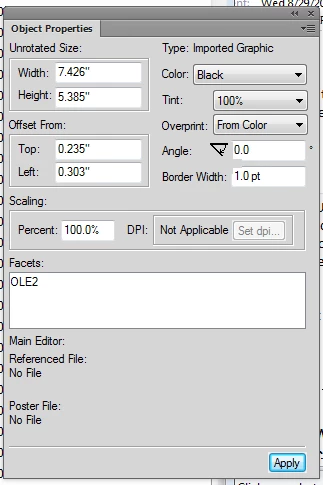
When drafting the framemaker document, the images were embedded.  Now I need to change this to be a imported image.  With the object properties shown below, can the dpi readily be determined?
This topic has been closed for replies.

2 replies

Matt-Tech Comm Tools
Community Expert
Community Expert
August 30, 2018

Assuming you're working with a bitmap image...

Are you able to right-click on the image and use the Edit With option to edit with Photoshop?

That would pass the image data into Photoshop so you could save the image out to disk.

-Matt Sullivan, FrameMaker Course Creator, Author, Trainer, Consultant
Inspiring
August 30, 2018

But, does it matter?

If there are 100 x 100 pixels and you set the dpi to 100 ppi, then the image is 1-inch square.

If there are 100 x 100 pixels and you set the dpi to 10 ppi, then the image is 10-inch square.

Same pixels, all that matters is how it prints in the text column.

I expect that image in Photoshop would be identified as 72 ppi, because that's what Photoshop defaults to. In Photoshop, you could set it to 100 ppi or 10 ppi, just as you can in FrameMaker.

Or am I underthinking this?

Cheers,

Sean

Matt-Tech Comm Tools
Community Expert
Community Expert
August 30, 2018

Strictly answering the question, knowing the pixels in PS would allow you to calculate the PPI based on the size of the image in Fm.

Figuring the PPI is a nifty party trick, but I'm unsure why it matters. You can't "improve" the quality of an existing image by changing the pixels in the file. However, if you needed to edit the image for some reason, the Edit With workflow would enable this.

-Matt Sullivan, FrameMaker Course Creator, Author, Trainer, Consultant
Inspiring
August 30, 2018

Hi,

So, use File >Import >File, and choose import by reference.

Then, set the DPI to what you want it to be to fit the raster image in your text column.

Does that help or were you trying to do something else?

Sean
