
QuintinSeegers
Legend
November 23, 2021
Answered

Different first (right) page - FM2019

  • November 23, 2021
  • 3 replies
  • 562 views

At the moment, in our Reference Pages, we have the following set up to apply the appropriate Master Pages to our Table of Content document:
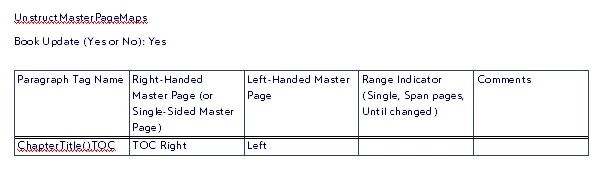
This works well in that the Master Pages are applied as expected. However, we would like to use a different Master Page for any subsequent right-hand pages (i.e. different first right-hand page).

Is this possible without manually applying a different Master Page to the first righ-hand page, or using scripts/3rd party add-ons?

    This topic has been closed for replies.
    Correct answer Winfried Reng

    Hi,


    The Apply Master Pages feature can apply pages only to the page with the specified paragraph format. It cannot apply master pages to the following pages.

    Isn't there any specific format which starts this page? E.g. the heading?

    Or could you create a special format for this case?


    Best regards


    Winfried

    3 replies

    4everJang
    Legend
    November 25, 2021

    You can remove the entry for Left and add 'Single' into the 4th column of this mapping table. That should make all the pages simply use Left and Right, except the page with the ChapterTitle()TOC is mapped to TOC Right. In this way, you do not need any specific format to return to the default Left and Right master pages.

    QuintinSeegers
    Legend
    November 25, 2021

    The left page isn't the issue. It's the right page. We don't want to use the default Right page for subsequent right pages. The ChapterTitle()TOC paragraph format appears several times in the Table of Content as it's the index to the Chapter Title - which could appear on any left/right page in the Table of Content, so relying on it won't work either.


    We ended up leaving the mapping as it is, and manually applying a different master page to the first page.

    4everJang
    Legend
    November 26, 2021

    I understand that the Left page is not the issue. And it will not make any difference whether it is in the table or not. The main point is restricting the mapping rule for the first page to Single so that it will not affect subsequent pages.

    About the ChapterTitle()TOC appearing multiple times: that will never work the way you want it. But manually setting a different master page for the first TOC page is a bad idea. There might be processes that reapply the master pages when opening or before publishing a document.


    Solution: Create a TOC header format that is inserted before the TOC and make that the trigger to apply the different first TOC master page. The paragraph that carries the triggering format does not actually need to contain any text. There should be a way to do this while keeping that paragraph even when refreshing the TOC, but I have no time now to test that. 

    K.Daube
    Community Expert
    Community Expert
    November 24, 2021

    Hello Quintin;

    Apply Right/Left to all pages of the TOC and use the specified mechanism only for the special first right page.

    (Just out of my head - untested).

    Winfried RengCommunity ExpertCorrect answer
    Community Expert
    November 24, 2021

    Hi,


    The Apply Master Pages feature can apply pages only to the page with the specified paragraph format. It cannot apply master pages to the following pages.

    Isn't there any specific format which starts this page? E.g. the heading?

    Or could you create a special format for this case?


    Best regards


    Winfried

    QuintinSeegers
    Legend
    November 24, 2021

    That would mean users have to manually add the title to the page, which is something I'm trying to avoid.

    Alas, looks like it isn't possible to automate. Best I can do is to have the Master Page manually applied to the first page.