Inspiring
Jul 14, 2023 9:45 PM UTC
Answered

Different paragraph format to the <paratext>

Hi!

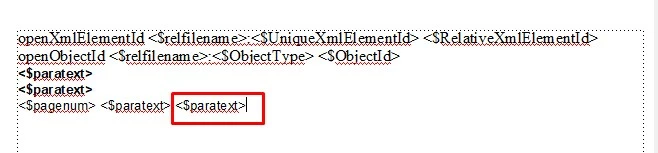
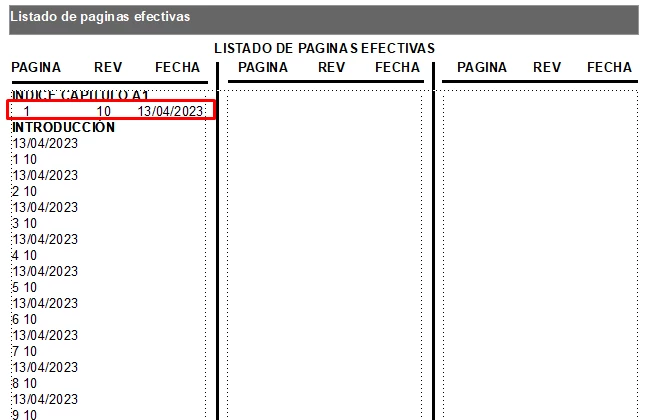
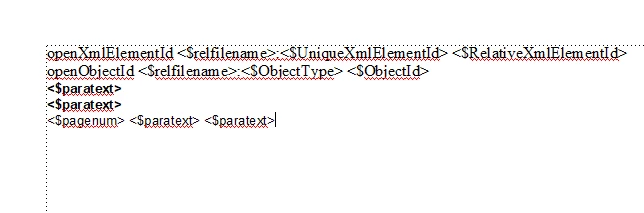
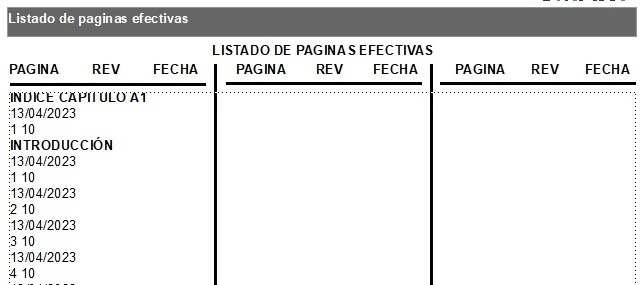
Im doing a List of Effective Pages with the LOP tool in framemaker, but I have a problem with the formatting of the table, because I cant put in the reference page two different <$paratext> , because I need the number page, rev, date in one row.


Please I need help!!!


thanks!!!
    This topic is closed to new replies. Start a new post to keep the conversation going.
    Gonzalo310894437ha2Correct answer
    Inspiring
    Jul 17, 2023 9:38 PM UTC

    Hi @Barb Binder ,


    I can move the data in the body pages, but when I update the book I miss this changes.


    I dont know what I have to do in the reference page or in the paragraph format in order that the numpage, revnum, revdate appear in the correct way.


    Hi @Barb Binder !!

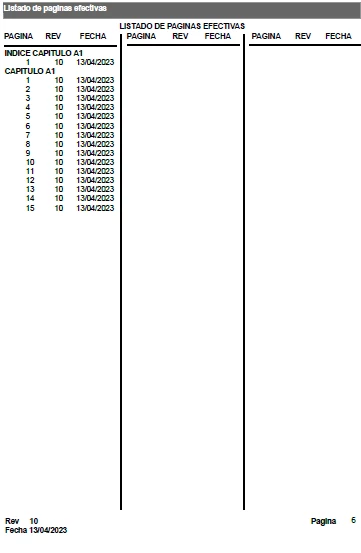
    I saw your webinar "Adobe FrameMaker Essentials – Part 6 – Document Review" and I can do it!!! Apparently the problem was in the flow. Thanks a lot!!

    9 replies

    Barb Binder
    Community Expert
    Community Expert
    Jul 16, 2023 11:28 PM UTC

    Hi @Gonzalo310894437ha2:


    it does not work, because I cant put two differente <$paratext> in the same line.

    Set up the paragraph above the RD_RevisionDateLOP as a run-in head (Para Designer > Pagination> and the RD_RevisionDateLOP will print on the same line as the previous one, but will still maintain its own paragraph style. 


    ~Barb

    Translate
    ~Barb at Rocky Mountain Training
    Inspiring
    Jul 17, 2023 2:57 AM UTC

    Hi Barb!


    It´s work! but Im still having a problem... the RD_RevisionDateLOP appear in up row in the body page, and I need that the date appear as the third data, can you help me with this? I dont know why the DATE cant appear in the correct position!! 


    Translate
    frameexpert
    Community Expert
    Community Expert
    Jul 17, 2023 12:02 PM UTC

    Items in FrameMaker generated lists always appear in document order. You can't change the order that they appear in the LOP.

    Translate
    www.frameexpert.com
    K.Daube
    Community Expert
    Community Expert
    Jul 15, 2023 8:06 AM UTC

    Gonzalo,

    I might misunderstand you. You may try to use a construct like this in the defining line

    <$pagenum> <$paratext[revpara], <$paratext[datepara]>

    That is, refer to a specific paragraph format containing the relevant information in its text  (revpara, datepara). But I'm not certain whether this works in your context.

    Translate
    Inspiring
    Jul 15, 2023 7:31 PM UTC

    Hi Daube!


    Im doing a List Of Effective Pages in a table of 3 columns, so I need that the table has a row with the numpage, rev, revdate , so I created two different paragraph format (RD_RevisionDateLOP and RN_Revision#LOP) to create the table, and Its work but when I try to put the 3 data in the reference page (num page , rev , revdate) it does not work, because I cant put two differente <$paratext> in the same line. I move the last <$paratext> to the upline, and its change the paragraph format automatically to the paragraph format of the upper line.


    Translate