
Participant
June 4, 2021
Answered

DITA: display author in PDF output

  • June 4, 2021
  • 2 replies
  • 869 views

I have a question on how you can display (add) an author in the PDF Output from a ditamap. I work with a team of 13 “content creators” and the only output our “customers” see is the PDF. It would be very useful to have the Author of the PDF (published from the ditamap) displayed in the Publishing Output so that our customers don’t have to guess which one was responsible for creating the document.


I have been able to display the author from a “.dita” file by adding a Running Footer to the Master Page of the DITA Templates (for Topic, Task, etc.) and using “<$elemtextonly[author]>”. Unfortunately, for a ditamap, you don’t have the option of adding a Running Footer to the “ditabase1.3.template.fm” file (which controls the PDF Publishing Output). Also, there doesn’t seem to be any element that you can add to the ditamap that could be used for the author.


Is there any way (or a workaround) that will allow me to add an author to the PDF output from a ditamap? Any help would be most appreciated.


Thanks,

Charles Woolley
    This topic has been closed for replies.
    Correct answer Stefan Gentz

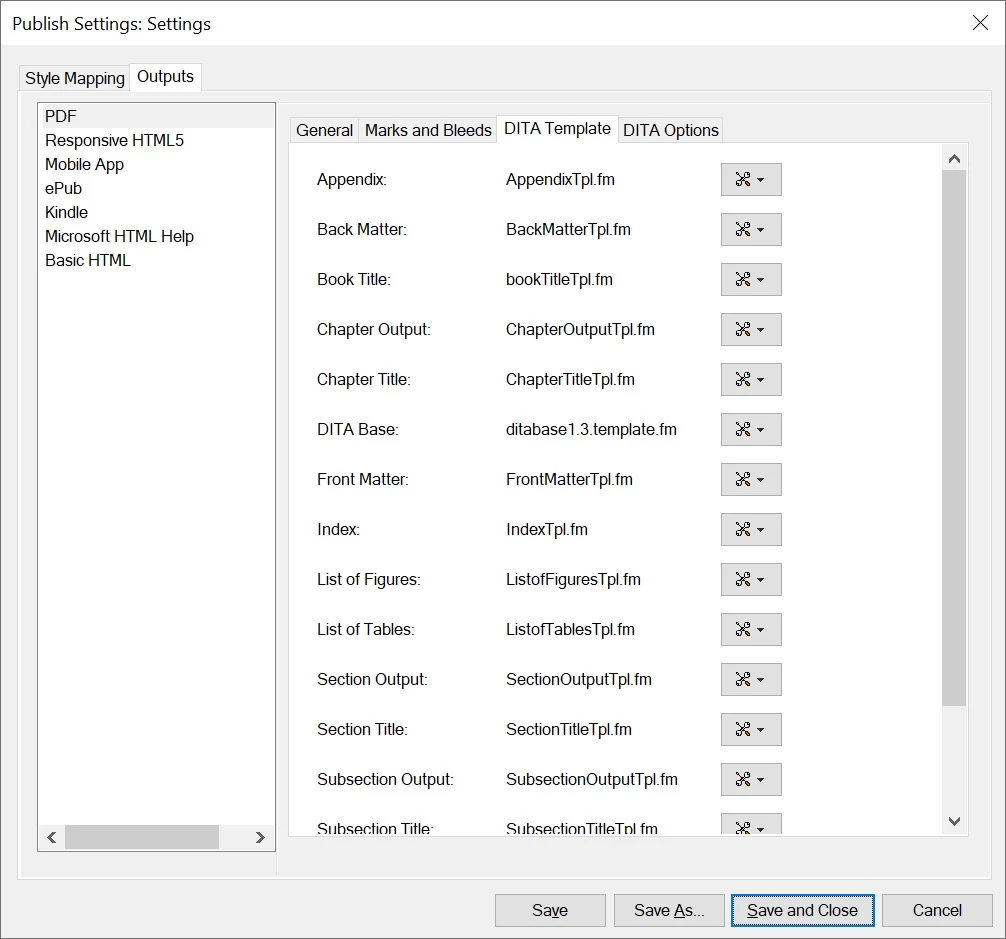
    You have loaded your modified template into the publish settings?

    Also, have you set RemovePrologInOutput to 0 in the ditafm-output.ini (in %appdata%\Adobe\FrameMaker\xx)? If it's 1 (as it is by default), the prolog will be hidden in PDF output generation and then the variable will not work as the author element is no longer visible, and therefore cannot be pulled by the variable anymore.


    2 replies

    Community Manager
    June 8, 2021

    In DITA, you add the author in the prolog of a topic:


    <?xml version="1.0" encoding="UTF-8"?>
    <!DOCTYPE topic PUBLIC "-//OASIS//DTD DITA Topic//EN" "topic.dtd" []>
    <topic id="id215VF10C05U">
       <title>Meta-Data in DITA</title>
       <shortdesc>How to add the author to a dita topic.</shortdesc>
       <prolog>
          <author>Stefan Gentz</author>
       </prolog>
       <body>
          (...)
       </body>
    </topic>


    To display this information in the header or footer of a page, do the following:

    1. In the template for the DITA document, choose View > Masterpages.
    2. Click into the header or footer text frame.
    3. Choose Insert > Variables.
    4. In the Variables panel, select one on running header/footer variables, e.g. Running H/F 10.
    5. Click Edit (the button with the pen). Replace the variable definition with <$elemtextonly[author]>.
    6. Click Update.
    7. Double-click on the variable to insert it into the header or footer text frame.
    8. Choose View > Body Pages. The author name will now appear in the header or footer.


    NOTE: This obviously only works if the prolog is actually displayed. If the prolog is hidden, the author variable will remain empty. Choose Structure > DITA > DITA Options... and check if Conditionalize Prolog on File Open is selected. If this is activated, FrameMaker will hide the prolog when opening a topic (the same applies to publishing).

    Participant
    June 8, 2021

    Thanks, but it still does not solve the "original" problem.


    Yes, I can see the "Author" in the original "{filename}.dita" file and I can see it when I view the Body Pages.  Unfortunately, I want to "Publish" this information in the actual PDF final document.  When ever I use the Publish Pod, no amount of "fiddling" allows me to actually put this "Author" information (that I see on the .dita file Body Page) to be "printed" in the final PDF.


    I have tried using Book (I have changed all of the template files to have the Footer with the correct variable) and changed the header/footer of those same templates.  I can Publish to PDF using Book and the Header/Footer is Perfect except that the Variable Running H/F 10 is not "captured" from the original .dita file.  You don't see the "Author" in the final PDF file.


    I am stumped as to how to get the actual information put in the .dita file into a PDF Output.  If you have any other suggestions, I would be very grateful.

    Thanks,

    Charles

    Stefan GentzCommunity ManagerCorrect answer
    Community Manager
    June 8, 2021

    You have loaded your modified template into the publish settings?

    Also, have you set RemovePrologInOutput to 0 in the ditafm-output.ini (in %appdata%\Adobe\FrameMaker\xx)? If it's 1 (as it is by default), the prolog will be hidden in PDF output generation and then the variable will not work as the author element is no longer visible, and therefore cannot be pulled by the variable anymore.


    Bob_Niland
    Community Expert
    Community Expert
    June 4, 2021

    Do you have any way to drive content to (at the Book level):
    File » File Info
    Author:

    That appears to populate, in the PDF:
    File » Properties » Description
    Author:

    (and my recollection is that the FM field, if empty, is pre-populated with the users login name, which has been a modest privacy concern in the past, but once revised, remains as intentionally set)

    Participant
    June 4, 2021

    Thanks, Bob.  No, I haven't tried that yet, but it was one of my next options.  Since the ditamap PDF output is controlled by only one template file, I wasn't too eager to go in that direction because of the number of template files that control the Book level. 


    I probably won't get to that today (June 4th), but I will definitely get to it next week.