
DITA: How to add “run into paragraph” attribute value to the image element?
I use framemaker 10 dita 1.2.
My customer asked me to set some images to "run into paragraph".
I know there are only two choices in the "placement" attribute drop box: inline and break.
So i added "value "runin" is fm property value run into paragraph" to the rule txt file as below:
attribute "placement" {
is fm attribute "placement";
is fm property position;
value "inline" is fm property value inline;
value "-dita-use-conref-target" is fm property value inline;
value "break" is fm property value bottom;
value "runin" is fm property value run into paragraph;
}
And then i added a "runin" option to both EDD and DTD.
But when i select "runin" in framemaker, nothing happens.
The DEVELOPING STRUCTURED APPLICATIONS WITH ADOBE® FRAMEMAKER 9 tells me that the position property has the following value:
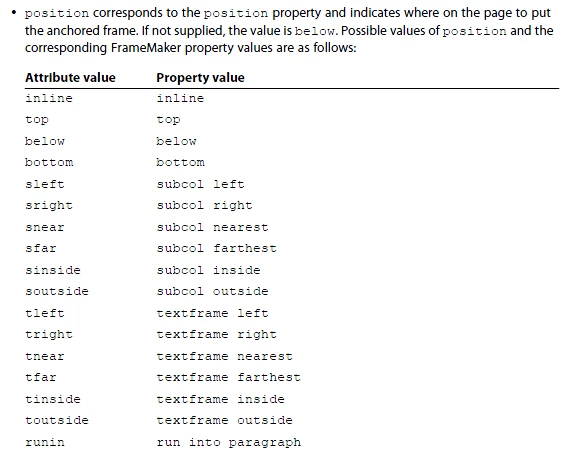
But the ADOBE® FRAMEMAKER® 9 STRUCTURED APPLICATION DEVELOPER REFERENCE tells me this.
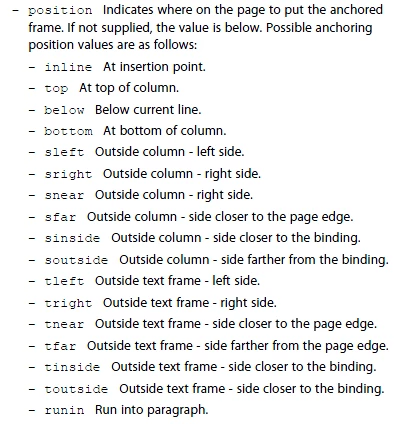
I've tried both runin and run into paragraph.
"runin" will generate an error log saying that there is a syntax error near identifier runin.
"run into paragraph" seems to be accepted but does not work.


 AdChoices