Sae1962
Participant
October 29, 2014
Answered

Document that is OK for oXygen remains full of errors under FrameMaker 12

  • October 29, 2014
  • 1 reply
  • 602 views

Hello everybody!

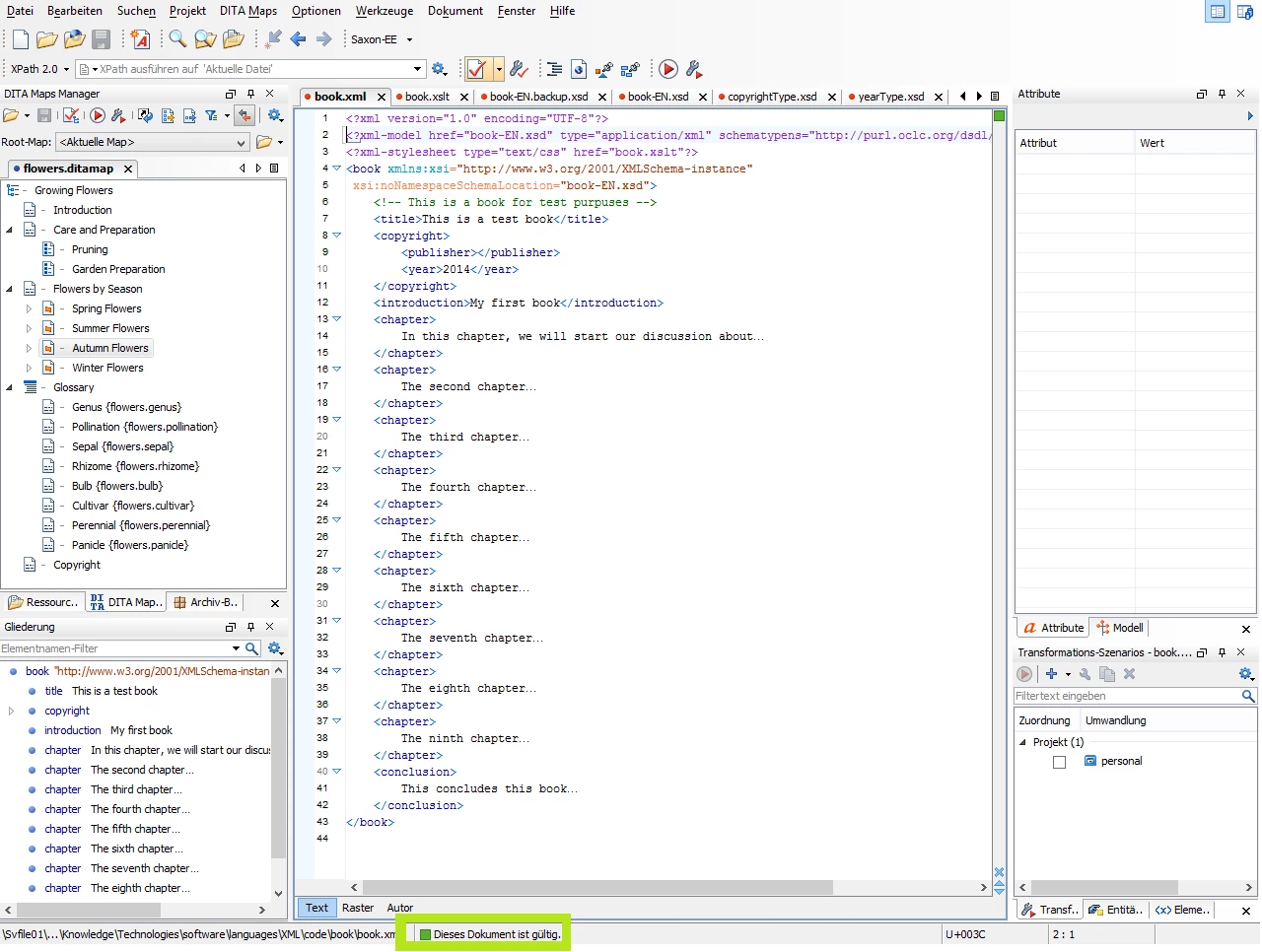
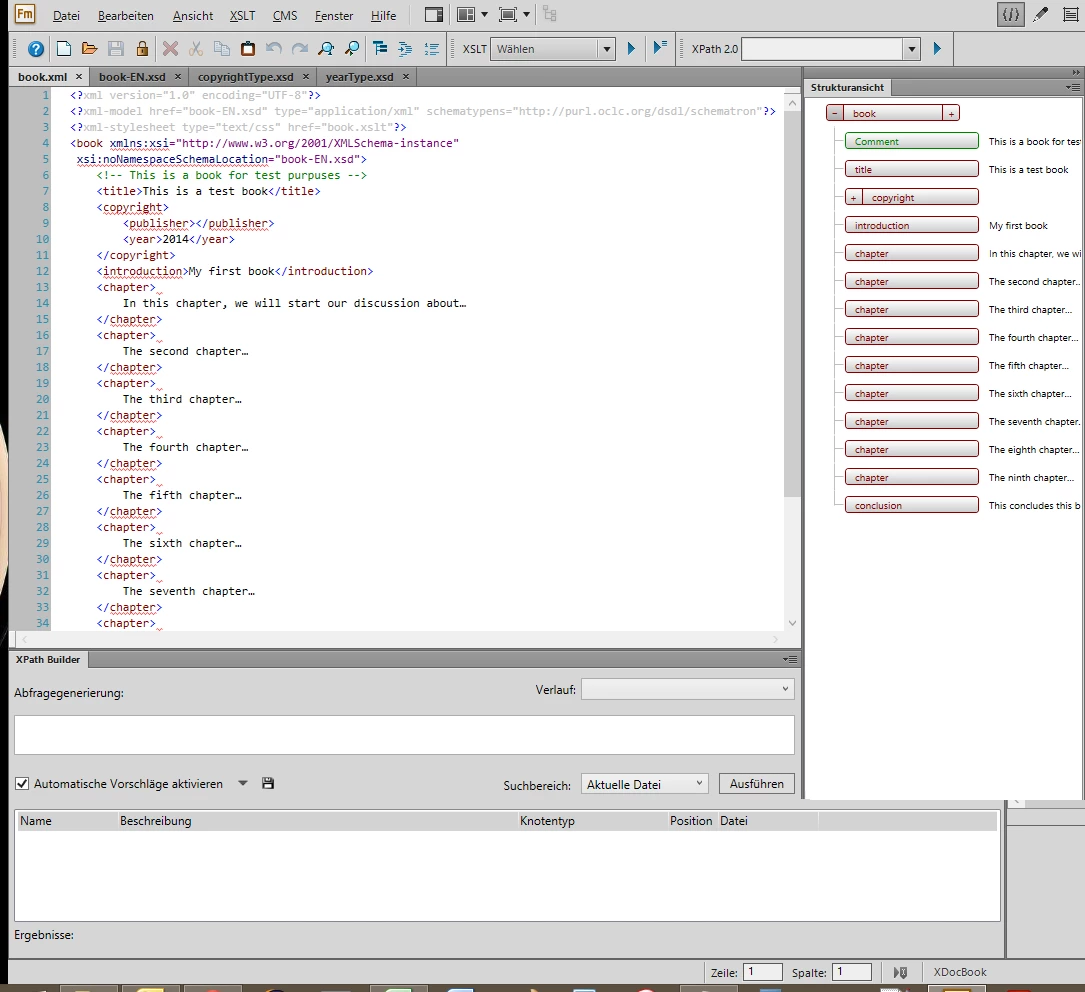
I will use Adobe FrameMaker 12 in author mode in an upcomming project, and I will continue testing it for two more weeks. As I am new to XML and document creation, I finished an online tutorial about XML and started now to create a document. I entered all files in one directory, then tested & corrected the contents with oXygen XML Author 16. Now, I opened the same files under FrameMaker 12 and have a lot of errors. As XML is a standard, I think that my code is not the problem. Do you have an idea why one & the same documents are evaluated differently by the two tools?

Thank you for your suggestions!

Note: As ist is not possible to upload a ZIP file, I add two images to show the problem.
[Moved from Scripting forum by moderator]

This topic has been closed for replies.
Correct answer ScottPrentice

In order to author an XML document in FrameMaker, you need to have (or create) an associated "structured application." This is a collection of files that tell FrameMaker how to validate and render the XML model. Unfortunately, this isn't a terribly simple thing to explain. The best place for you to start is the Structure Dev Guide (see "Learn how to create a FrameMaker structured application" half way down this page) ..

     http://www.adobe.com/devnet/framemaker.html

If you've got an XSD, you'll need to generate a DTD from that, which is one of the files in the structured application. You should scan this page as well for more info ..

     http://help.adobe.com/en_US/framemaker/using/WSD7FBA378-86FB-49ad-82EA-CCCFF5CC9524.html

If you're just working with XML "code," FrameMaker may be more effort than you really need. It's strength is in rendering the XML, and that's where much of the files in a structured application will focus. You can set up a very basic app that applies minimal styling, but it comes with a considerable learning curve.

Cheers,

Scott Prentice

Leximation, Inc.

www.leximation.com

1 reply

ScottPrentice
ScottPrenticeCorrect answer
Inspiring
October 29, 2014

In order to author an XML document in FrameMaker, you need to have (or create) an associated "structured application." This is a collection of files that tell FrameMaker how to validate and render the XML model. Unfortunately, this isn't a terribly simple thing to explain. The best place for you to start is the Structure Dev Guide (see "Learn how to create a FrameMaker structured application" half way down this page) ..

     http://www.adobe.com/devnet/framemaker.html

If you've got an XSD, you'll need to generate a DTD from that, which is one of the files in the structured application. You should scan this page as well for more info ..

     http://help.adobe.com/en_US/framemaker/using/WSD7FBA378-86FB-49ad-82EA-CCCFF5CC9524.html

If you're just working with XML "code," FrameMaker may be more effort than you really need. It's strength is in rendering the XML, and that's where much of the files in a structured application will focus. You can set up a very basic app that applies minimal styling, but it comes with a considerable learning curve.

Cheers,

Scott Prentice

Leximation, Inc.

www.leximation.com

Sae1962
Sae1962Author
Participant
October 30, 2014

But this option of StructureTools does not exist in the reduced version of Adobe FrameMaker 12 XML Author, does it? I searched for a tutorial about this subject, but no avail. At least, I cannot find the (sub)menu for it.

ScottPrentice
Inspiring
October 30, 2014

Ah, you're using FM XML Author? You can't crete a structure application with XML Author, you need full FM for that. You'd need to create the structure application with a full version of FM, then "install" that into XML Author.

If you need help doing this, feel free to contact me (or other FM consultant) off-list.

Thanks,

Scott Prentice

Leximation, Inc.

www.leximation.com