
Known Participant
April 26, 2020
Answered

does ESTK doc.UnWrapElement() really work?

  • April 26, 2020
  • 1 reply
  • 1033 views

I'm using FM 2017 with ESTK 4.5.5.

I've been having issues trying to unwrap an element via scripting. I can do it manually using the Element->Unrwap menu which tells me the structured document is OK. 

Here's the code


#target framemaker

var flow, root;
doc = app.ActiveDoc;
 
flow = doc.MainFlowInDoc;
root = flow.HighestLevelElement;

var eRange = new ElementRange;
var th1st = root.FirstChildElement;// thead
var th2nd = th1st.NextSiblingElement; // next thead
var charFmt2 = th2nd.FirstChildElement;
        
eRange.beg.parent = charFmt2;
eRange.beg.child = charFmt2.FirstChildElement;
eRange.beg.offset = 0;
eRange.end.parent = charFmt2.FirstChildElement;
eRange.end.child = charFmt2.NextSiblingElement;
eRange.end.offset = 0;
doc.ElementSelection = eRange;  
doc.UnWrapElement();


As the snapshot shows, the code above successfully selects the element I want to unwrap, but doc.UnWrapElement() does not have any effect when it's called.
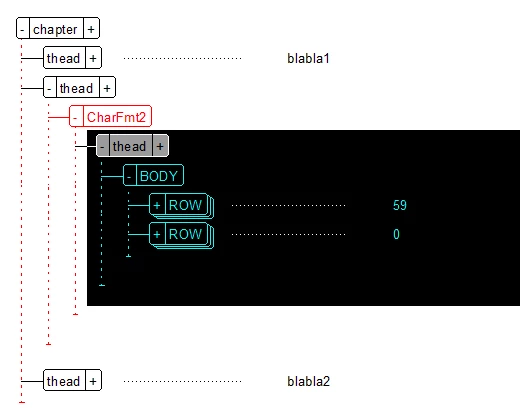


Any thoughts on what might be going wrong here?

Thanks.

This topic has been closed for replies.
Correct answer Russ Ward

Hi,


It should work. Without studying your script too closely (and it is hard to follow your variable name conventions 🙂  I do not see any obvious problem. And, if it is selecting the element correctly, it should work. One thing does stand out from the screenshot... it really looks like you are trying to unwrap a table element, which is not permitted. The UI should reject that action too.


Here is the function I use to unwrap elements, maybe it will help some if the table element is not the issue:


function UnwrapElement(doc, elem)
{
    if(elem == null || !doc.ObjectValid() || !elem.ObjectValid()) return;
    
    var er = new ElementRange;
                
    er.beg.parent = er.end.parent = elem.ParentElement; 
    er.beg.child = elem;
    er.end.child = elem.NextSiblingElement;
    er.beg.offset = er.end.offset = 0;
    
    doc.ElementSelection = er;
    
    doc.UnWrapElement();
};


Russ

1 reply

Russ WardCorrect answer
Legend
April 28, 2020

Hi,


It should work. Without studying your script too closely (and it is hard to follow your variable name conventions 🙂  I do not see any obvious problem. And, if it is selecting the element correctly, it should work. One thing does stand out from the screenshot... it really looks like you are trying to unwrap a table element, which is not permitted. The UI should reject that action too.


Here is the function I use to unwrap elements, maybe it will help some if the table element is not the issue:


function UnwrapElement(doc, elem)
{
    if(elem == null || !doc.ObjectValid() || !elem.ObjectValid()) return;
    
    var er = new ElementRange;
                
    er.beg.parent = er.end.parent = elem.ParentElement; 
    er.beg.child = elem;
    er.end.child = elem.NextSiblingElement;
    er.beg.offset = er.end.offset = 0;
    
    doc.ElementSelection = er;
    
    doc.UnWrapElement();
};


Russ

Known Participant
April 28, 2020

Hi Russ,


Yes, my range was picking up the BODY  element. My original code (not posted here) had that bug.

Thanks.