

Community Expert
September 12, 2025
Question

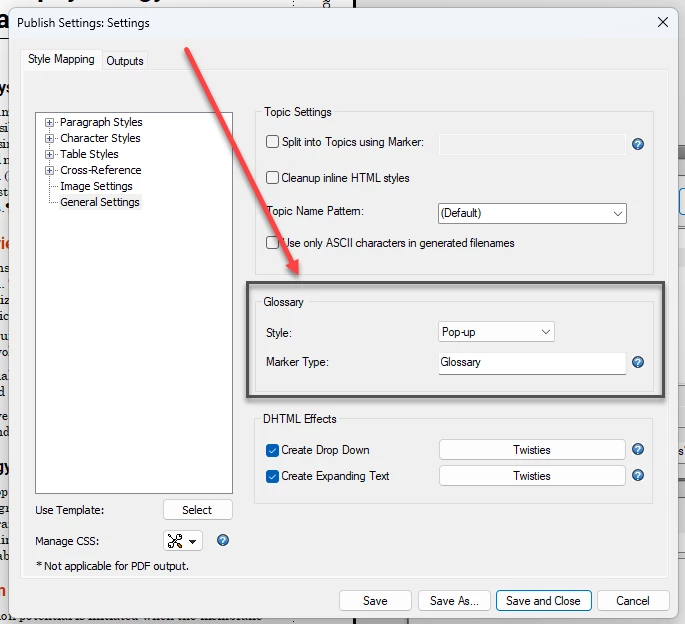
Does the Glossary popup/tooltip etc work when publishing to HTML5?

  • September 12, 2025
  • 2 replies
  • 272 views

I am publishing a book to HTML5. The text contains words which I want to have in glossary. I should be able to get a tooltip/popup etc on the glossary terms, but that does not happen in the published HTML5. The markup looks right - I do have the terms/definitions included in the glossary, but no visible indicator. 

I have used all three skins with the same lack of results.

So... does the feature work? If it works - how?

FrameMaker  Version: 17.0.7.842
 

    2 replies

    Jeff_Coatsworth
    Community Expert
    Community Expert
    September 12, 2025

    I can get a glossary tab created in my HTML5 output, but that's only due to importing the FM content into a RoboHelp project and generating the HTML5 from there. Even then, it doesn't appear as a pop-up on the terms in the text, but a separate function tab with drop-downs for the definitions.

    Community Expert
    September 12, 2025

    The glossary tab is a built-in feature in the skins, that comes with FrameMaker. Glossary words will appear correctly in that tab.

    Bjørn Smalbro - FrameMaker.dk
    Jeff_Coatsworth
    Community Expert
    Community Expert
    September 12, 2025

    Ah, so that part is working? Just not the pop-ups on the terms in the topic text?

    Jeff_Coatsworth
    Community Expert
    Community Expert
    September 12, 2025

    Got me. According to this - https://help.adobe.com/en_US/framemaker/using/index.html#t=using-framemaker%2Fuser-guide%2Ffrm_books_bk-glossaries.html - you use 2 different types of markers.

    Both Rick & Barb have entries about glossaries, but they're a bit out of date for v2022 and seem to talk mostly about print glossaries. See https://www.rockymountaintraining.com/adobe-framemaker-creating-a-simple-glossary-for-a-book/ and https://techcommtools.com/by-request-framemaker-glossary-and-glossaryterm-markers/ 

    Community Expert
    September 12, 2025

    Thank you @Jeff_Coatsworth Yes, working with glossaries in print works fine. What perplexes me, are the options for having a tool tip or a hyperlink showing in the html5 version. I can't seem to make that feature work.

    Bjørn Smalbro - FrameMaker.dk