



Drawing arcs with ESTK ...
Dear friends,
Next step after lines and polylines: I want to draw arcs (with a constant radius) and encounter a similar problem as with the lines in the different quadrants.
The blue lines are what I want to achieve. The outer three are correct, their starting angle is ≥ 0. The inner ones have starting angles -90, -60 and -30 degrees, which converted to 270, 300 and 330 respectively - because negative values are not allowed (they are interpreted as 0).
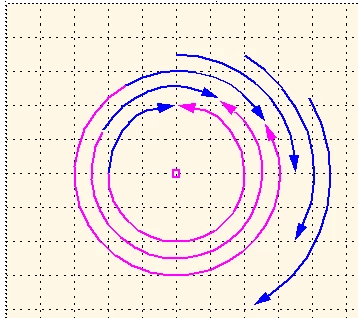
I do not see how to force the Arc object to draw what I want. Drawing with UI is not easier: To get the desired angles is quite simple, but to get the arc in correct position after rotation …
It seems that I need a comparable approach to the Line function (a multitude of transformations).
#target framemaker
main();
function main () {
var j, oDoc, oFrame, x0, y0, r, th0, thf, aArcs = [];
CM = 1857713, PT = 65536, DEGREE = 65536, pi = Math.PI;
oDoc = app.ActiveDoc;
oFrame = oDoc.FirstSelectedGraphicInDoc;
if (!oFrame.ObjectValid()) {
Alert("Select an anchored frame and try again.", Constants.FF_ALERT_CONTINUE_WARN);
return;
}
for (j= 0; j < 6; j++) { // FM-coordinate systemin cm
r = 2 + j*0.5; // 2, 2.5, 3.0, ...
th0 = -90 + j* 30; // -30, 0, 30, ...
thf = th0 + 90;
aArcs
= DrawArc(oDoc, oFrame, 5, 5, r, th0, thf); aArcs
.BorderWidth = 0.05*CM; aArcs
.Color = oDoc.GetNamedColor("Magenta"); aArcs
.HeadArrow = 1; // default arrows }
} //--- end main
function DrawArc(oDoc, oFrame, x0, y0, r, th0, thf) { // === Draw an arc ==========================
// Arguments x0/y0 coordinates of center point [CM] FM coord system
// r radius of circular arc
// th0 Angle (degrees) of start-point
// thf Angle (degrees) of end-point
// Returns object (e.g. for grouping)
var oArc, th1,
CM = 1857713, PT = 65536, DEGREE = 65536, pi = Math.PI;
oArc = oDoc.NewArc(oFrame);
oArc.Width = r * CM;
oArc.Height= r * CM; // let's start with a square 90° arc
oArc.LocX = x0 * CM;
oArc.LocY = (y0 - r) * CM;
if (th0 < 0) {th0 = th0 + 360;}
oArc.Theta = th0 * DEGREE;
oArc.DTheta = (th0 - thf)* DEGREE;
oArc.Theta = th0 * DEGREE;
oArc.DTheta = (thf - th0)* DEGREE;
return oArc;
} //--- end DrawArc


 AdChoices