

frameexpert
Community Expert
Community Expert
August 26, 2022
Answered

EDD Design Challenge

  • August 26, 2022
  • 1 reply
  • 384 views

Hi All, I have an interesting EDD issue that I am trying to solve. Here is a screenshot of my document and structure. The requirement is to have the range1, range2, and child3 elements on the same line (in the same paragraph). To achieve that, my EDD has the yellow elements defined as text ranges. And it works.
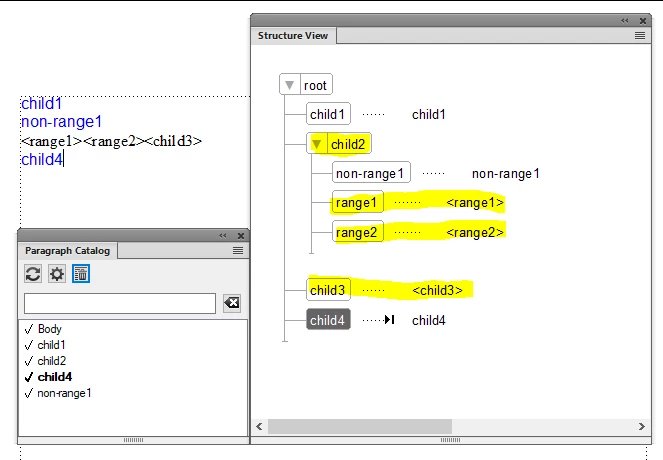
 

However, here is the mystery. While I can apply character formatting to each of the text ranges, I can't figure out how to affect the paragraph where all three text ranges sit. It defaults to Body, but I can't figure out how to access the paragraph in the EDD. For example, this rule doesn't do anything:
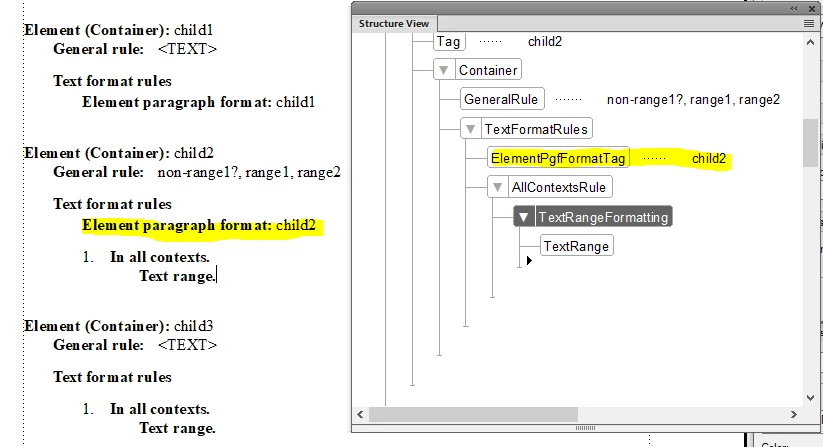


And I guess that makes sense, since I had to define the child2 element as a text range. I am thinking that the paragraph where all three text ranges sit is unreachable in the EDD. Anyone know for sure? Thanks.


    This topic has been closed for replies.
    Correct answer Lynne A. Price

    Rick,

       Text ranges don't have paragraph properties. You can only assign paragraph properties to paragraph elements. There are various ways to produce the desired result:

    1. Introduce a new element that contains the three text ranges. If your project uses XML, you can unwrap that element on export and create it with XSLT on import.

    2. Make the three elements paragraphs, with the first two run-in heads.

    3. If it fits with the rest of the formatting in the document, make the default paragraph format the one you want for these elements.

       --Lynne

    1 reply

    Lynne A. PriceCorrect answer
    Inspiring
    August 26, 2022

    Rick,

       Text ranges don't have paragraph properties. You can only assign paragraph properties to paragraph elements. There are various ways to produce the desired result:

    1. Introduce a new element that contains the three text ranges. If your project uses XML, you can unwrap that element on export and create it with XSLT on import.

    2. Make the three elements paragraphs, with the first two run-in heads.

    3. If it fits with the rest of the formatting in the document, make the default paragraph format the one you want for these elements.

       --Lynne

    frameexpert
    Community Expert
    Community Expert
    September 6, 2022

    Thank you Lynne.