
QuintinSeegers
Legend
October 5, 2021
Answered

Element Attributes when converting to structured (FM2019)

  • October 5, 2021
  • 1 reply
  • 636 views

In our unstructured documents, we have a table (nt Notes Table) we use to insert various notes. We use a paragraph style (ns Notes) to format the note text. We also use diffent paragraph styles to insert an appropriate image, depending on the type of note, e.g.:

  • nti  Notes Table - Important Notes Icon
  • ntg Notes Table - General Notes Icon
  • ntr Notes Table - Reference Notes Icon, etc.

In our EDD, we have a NoteType attribute against our Notes Table Element that identifies the type of note, e.g. Important, General, Reference, etc.

In our Conversion Table, we have the following:
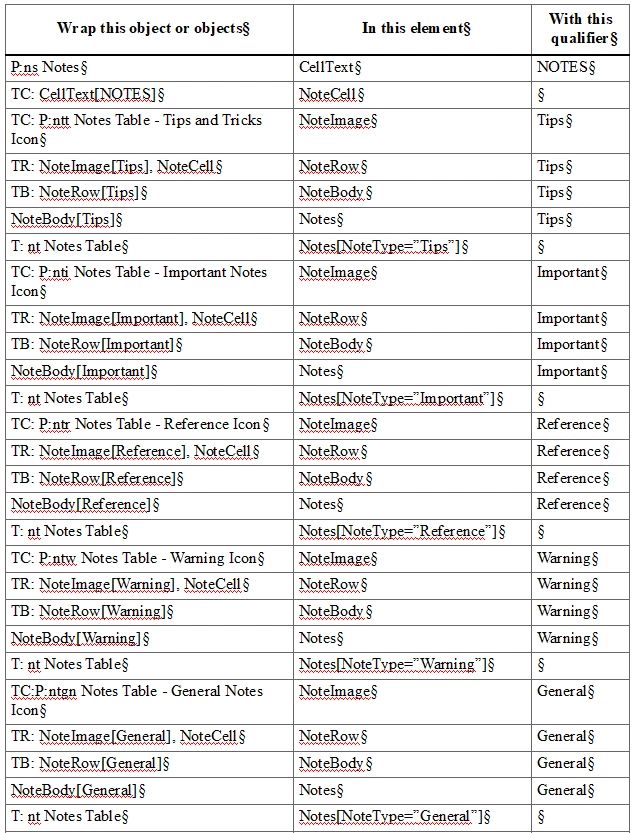
The conversion correctly converts all the elements. Our problem is that the NoteType attribute isn't assigned correctly. It is always assigning the "General" attribute value, which is the last one in the list.

I know it's probably one of those "can't see for looking" mistakes I've made in the conversion table.

Asking the EDD gurus 🙂

    This topic has been closed for replies.
    Correct answer frameexpert

    You may need to pre-process the document so that you assign a different table format to each type of note table. It probably makes more sense to post-process the document to assign the correct attribute to each structured table. In my experience, a conversion table can get you to about 80% of where you want to go and the rest needs to be accomplished after the conversion. Some post-cleanup can be done with scripting, while others may need a human decision maker.

    1 reply

    frameexpert
    Community Expert
    Community Expert
    October 5, 2021

    All of the T:nt Notes Table entries in the left-column are the same, so the last one wins. You need a way to distinguish the tables in the first column of the table.

    QuintinSeegers
    Legend
    October 6, 2021

    We use the same table format regardless of the note type. I am open to suggestions on how to achieve what you're suggesting.

    frameexpert
    Community Expert
    frameexpertCommunity ExpertCorrect answer
    Community Expert
    October 6, 2021

    You may need to pre-process the document so that you assign a different table format to each type of note table. It probably makes more sense to post-process the document to assign the correct attribute to each structured table. In my experience, a conversion table can get you to about 80% of where you want to go and the rest needs to be accomplished after the conversion. Some post-cleanup can be done with scripting, while others may need a human decision maker.