Participating Frequently
July 20, 2020
Question

Eliminate Options Menu Selection in Microsoft HTML Help

  • July 20, 2020
  • 4 replies
  • 366 views

Is there any way to generate a Microsoft HTML Help file (.chm) from FrameMaker that does not include the Options top menu selection?
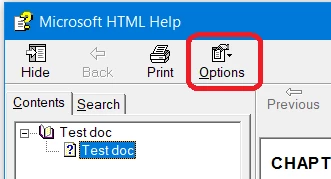
Thanks, Rick

    This topic has been closed for replies.

    4 replies

    Legend
    July 27, 2020

    It seems there might be a way to do it in the chm files, which is of course not what you want; but I can't check it before mentioning it. We use WebHelp.

    Hezy A
    Inspiring
    July 26, 2020

    Click on the Advanced Button in the Settings. It seems you can edit the UI settings there. Maybe one of the options in that Tab will make the required change

    hitch66Author
    Participating Frequently
    July 26, 2020

    Hi Caroline. I checked that already. There are no options for editing the top menu bar.

    Jeff_Coatsworth
    Community Expert
    Community Expert
    July 20, 2020

    Really? Because FM uses the RH Classic engine under the hood to create output like that. Maybe there is something you can tinker with in the settings (I've never created CHMs, so I'm no help).

    Jeff_Coatsworth
    Community Expert
    Community Expert
    July 20, 2020

    Highly doubtful - that's antique MS technology there...you might try editing in HTML Workshop after generating it.

    hitch66Author
    Participating Frequently
    July 20, 2020

    Hey, I know—I'm a contractor stuck with what the client wants. It's weird because .chm files generated with RoboHelp do not have that option. I'll see what I can do with HTML Workshop. Thanks!