frameexpert
Community Expert
Community Expert
August 23, 2016
Answered

End Element of a ElementRange

  • August 23, 2016
  • 5 replies
  • 1231 views

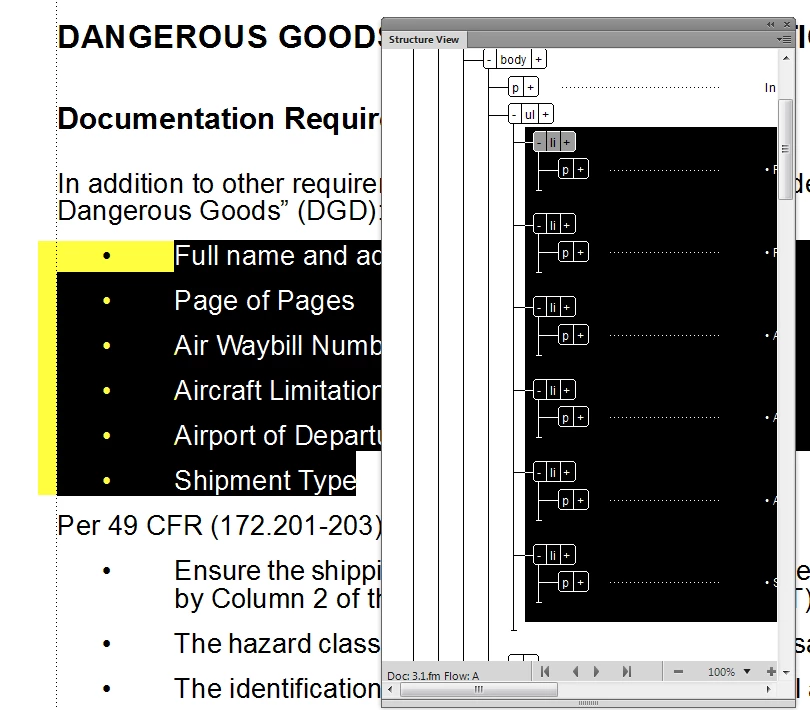
First, here is a picture to illustrate what I am trying to do:

Given an ElementRange, I am trying to find the upper and lower boundaries of that range, as in the FP_LocY values (show visually in yellow). The upper value is easy, because I can get the top element in the ElementRange. But I am not sure the best approach for getting the lower value. Any help will be appreciated. Thanks.

-Rick

This topic has been closed for replies.
Correct answer Russ Ward

Rick, I think I follow you, but I'm not 100% sure. Here is a revision to that function, that first gets the last sibling element in the selection, then walks down the last branch(es) to the furthest extent. If this is not what you are looking for, then I think it might be much more complicated than I understand. Also, by the way, FrameSLT does not support that XPath expression. I don't believe there is an equivalent, but I'd really have to think about it.

Also, you certainly understand this, but let me note for others that this function is missing lots of important error handling. It is only robust if the input is exactly as expected (ie, a valid document with a valid element selection).

Russ

function getLastSelectedElement(doc)

{

  var er = doc.ElementSelection;


  var lastElem;

  var tempLastElem;

  var elem = er.beg.child;

  while(elem.ObjectValid() && elem.id != er.end.child.id)

  {

     //alert(elem.ElementDef.Name);

     tempLastElem = elem;

     elem = elem.NextSiblingElement;

  }

  while(tempLastElem.ObjectValid())

  {

    lastElem = tempLastElem;

    tempLastElem = tempLastElem.LastChildElement;

  }

   return lastElem;

}

5 replies

4everJang
Legend
August 25, 2016

Russ mentioned that the script might get wrong results when the structure is invalid. It is pretty easy to determine the validity of an element and incorporate that into the script. If you want I can dig out a piece of code that does this. Also, I am not sure whethet even an invalid structure would break the code.

frameexpert
Community Expert
Community Expert
August 25, 2016

By the time I get to this code, I will have done some checking to make sure I pass in a valid ElementRange. Thanks anyway.

www.frameexpert.com
4everJang
Legend
August 25, 2016

The LocY of the last element in the selection is still not the exact location of the end of your custom change bar, though. You would have to add the height of that last element, which may be a tricky thing to do again. If you find the next element beyond your selection and pick up the LocY from there, you then only need to determine whether that paragraph is on a new page and, if not, take its LocY minus the offset above that paragraph. I would expect that to give a better result than working your way down from a LocY that points to the top of an element. Makes sense ?

frameexpert
Community Expert
Community Expert
August 25, 2016

Once I get the top and bottom elements, then I can get the top and bottom paragraphs and make my LocY calculations from there. In my preliminary tests, this seems to work fine. I have to start with elements, though, because they have the attribute values that I need to check for.

www.frameexpert.com
Russ WardCorrect answer
Legend
August 25, 2016

Rick, I think I follow you, but I'm not 100% sure. Here is a revision to that function, that first gets the last sibling element in the selection, then walks down the last branch(es) to the furthest extent. If this is not what you are looking for, then I think it might be much more complicated than I understand. Also, by the way, FrameSLT does not support that XPath expression. I don't believe there is an equivalent, but I'd really have to think about it.

Also, you certainly understand this, but let me note for others that this function is missing lots of important error handling. It is only robust if the input is exactly as expected (ie, a valid document with a valid element selection).

Russ

function getLastSelectedElement(doc)

{

  var er = doc.ElementSelection;


  var lastElem;

  var tempLastElem;

  var elem = er.beg.child;

  while(elem.ObjectValid() && elem.id != er.end.child.id)

  {

     //alert(elem.ElementDef.Name);

     tempLastElem = elem;

     elem = elem.NextSiblingElement;

  }

  while(tempLastElem.ObjectValid())

  {

    lastElem = tempLastElem;

    tempLastElem = tempLastElem.LastChildElement;

  }

   return lastElem;

}

frameexpert
Community Expert
Community Expert
August 25, 2016

Here is some back story on what I am trying to do. I need to draw pseudo change bars in the margin next to elements with a particular attribute, or alternatively, next to an element selection. So I need to find the "top" and "bottom" elements in the range. Then I calculate their LocY values so I can determine the height of the change bars. In experimenting, I have found some strange issues when a single element with children is selected. In this case, the most accurate results come when I use the first child and the last element in the selection to get my values. Thus, in the screenshot, if it was the entire ul element that was selected, I would want the first li and the very last p in the branch to get the correct values. So I have come up with this somewhat convoluted code, which seems to satisfy any combination of element ranges. Of course, I still have to deal with selections that cross text columns or pages, but that is the next task to tackle.

#target framemaker

var doc = app.ActiveDoc;

var elementRange = doc.ElementSelection;

var elements = getTopAndBottomElements (elementRange);

alert (elements.top.ElementDef.Name);

alert (elements.bottom.ElementDef.Name);

function getTopAndBottomElements (elementRange) {


    var elements = {}, topElement, bottomElement, lastElement;


    topElement = elementRange.beg.child;

    bottomElement = getLastSiblingElement (elementRange);


    if (topElement.id === bottomElement.id) { // Single element selected.

        if (topElement.FirstChildElement.ObjectValid () === 1) {

            elements.top = topElement.FirstChildElement;

            elements.bottom = getLastElementInBranch (topElement);

            return elements;

        }

        else { // No first child, just a single element.

            elements.top = elements.bottom = topElement;

            return elements;

        }

    }

    else { // Consecutive siblings selected.

        elements.top = topElement;

        lastElement = getLastSiblingElement (elementRange);

        if (lastElement.ObjectValid () === 1) {

            elements.bottom = getLastElementInBranch (lastElement);

        }

        return elements;

    }  

}

function getLastSiblingElement (elementRange)  {


    var lastElement, element;

    element = elementRange.beg.child;

    while (element.ObjectValid () && element.id !== elementRange.end.child.id)  {

        lastElement = element;

        element = element.NextSiblingElement;

    }

    return lastElement;

}

function getLastElementInBranch (element) {


    var elements, lastElem = 0;


    elements = getAllElements (element, []);

    if (elements.length) {

        lastElem = elements[elements.length - 1];

    }

    return lastElem;

}

function getAllElements (element, elements) {

    var elements2;


    if (element.ElementDef.ObjectValid ()) {

        elements.push(element);

    }

    element2 = element.FirstChildElement;

    while (element2.ObjectValid ()) {

        elements = getAllElements (element2, elements);

        element2 = element2.NextSiblingElement;

    }

    return elements;

}

www.frameexpert.com
4everJang
Legend
August 25, 2016

Hi Rick,

If you look at the structured document with element boundaries switched on, you will see that the textrange of the last <li> does include all of the child elements inside that <li>. This means that the text location of the end boundary of that <li> is in the same paragraph object as that of the last <p> (or anything else) inside that <li>.

There is no need to make things more complicated than they already are. Unless there is something else you are trying to do here.

Ciao

Jang

4everJang
Legend
August 23, 2016

Hi Rick,

If I understand correctly, you are looking for physical (i.e. screen) locations rather than logical or stuctural locations.

Use the TextRange of the last element in your range to find the last paragraph in that last element. Then select the next paragraph in the same flow and you have the lower LocY boundary of your selection. Of course that next paragraph might be on a new page.

frameexpert
Community Expert
Community Expert
August 23, 2016

Hi Jang,

Thanks. I was looking for a reliable way to get the last element in the selection.

Rick

www.frameexpert.com
Legend
August 24, 2016

Hi Rick,

Piece of cake! Here is a function that returns the last element in the selection. Note that it only works when contiguous siblings are selected, not with elements on different branches selected (like when you select a table column). That takes more work. I put an alert in there so you could see it work.

Russ

function getLastSelectedElement(doc)

{

   var er = doc.ElementSelection;


   var lastElem;

   var elem = er.beg.child;

   while(elem.ObjectValid() && elem.id != er.end.child.id)

   {

      alert(elem.ElementDef.Name);

      lastElem = elem;

      elem = elem.NextSiblingElement;

   }

   return lastElem;

}