


Inspiring
September 5, 2014
Answered

Eps files not showing up in FM

  • September 5, 2014
  • 2 replies
  • 429 views

Hi,

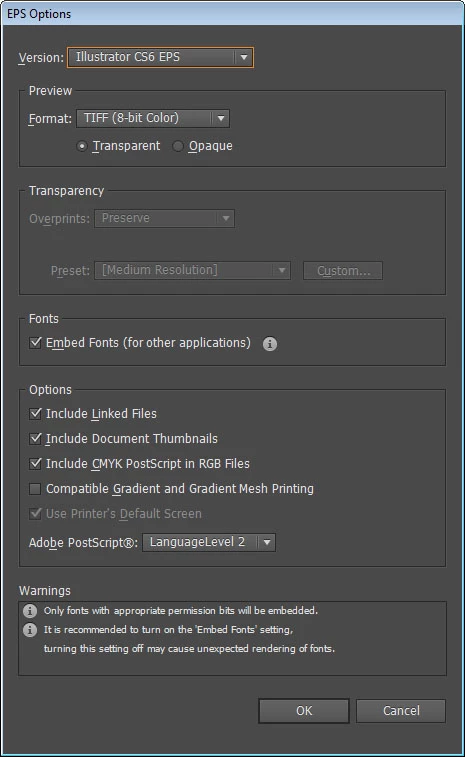
I made an eps file in Illustrator, and when I import it into FM I get an empty box.  I've included a screen shot of my eps options.   What am I doing wrong?   I just updated to a new computer.  It's the same CS6 software.  Windows 7.
    This topic has been closed for replies.
    Correct answer Ktorrance

    That doesn't matter, as I use a 64-bit version without any issues.

    Try saving in a much older format.

    If the graphic is just an image (as it appears to be in the screen capture), I would recommend using Photoshop or another image editor for this task instead.


    Here is the fix: Run Adobe Applications as Administrator.

    2 replies

    KtorranceAuthor
    Inspiring
    September 5, 2014

    I get this error too when I first save a new file as an eps.  I hit OK and then it saves.  And if I save it again with a new name I don't get this error.

    Arnis Gubins
    Inspiring
    September 5, 2014

    Change the Preview format from Transparent to Opaque. FM can't handle transparency.

    KtorranceAuthor
    Inspiring
    September 5, 2014

    Hi Arnis,

    This did not help.  I"m at a loss of what's wrong.