
Known Participant
June 1, 2023
Question

Error 17014

  • June 1, 2023
  • 4 replies
  • 1328 views

When I open a Framemaker book, select all and show/hide conditional text apply I get an error which nobody knows what it it and how to solve it.

Sometimes things help like:

1. Apply the conditional text one by one,

2. Update book,

3. Open all files and 'save and open files'.
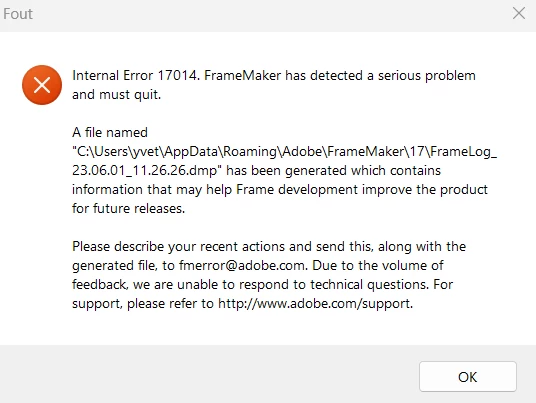
Usually they don't help. I have hundreds op books and there is no way to solve this problem...

Is anybody familiar with this?


This is in the log:


=== Header Begin ===
Internal Error: 17014
FrameMaker 17.0.1 for Intel
Build: 17.0.1.305
Window System: MSWindows
Operating System: Windows NT 10.0 (major.minor.build: 10.0.22621 )
Generated on: donderdag 25 mei 2023 13:21:42
To file: C:\Users\yvet\AppData\Roaming\Adobe\FrameMaker\17\FrameLog_23.05.25_13.21.42_meta.txt
Locale: English
Current Mode: Maker
Current View: (null)
=== Header End ===


=== Open Window List Begin ===
# not implemented
=== Open Window List End ===


=== Recent Commands Begin ===
=== Recent Commands End ===


=== Recent API Calls Begin ===
# not implemented
=== Recent API Calls End ===


=== Last few fcodes Begin ===
0x367
=== Last few fcodes End ===


This topic has been closed for replies.

4 replies

Participant
June 7, 2023

I can reproduce the 17014 error here. For my case I must do:

I open FM. This works. Then I'll open FM a 2nd time and the 2nd FM instance crashes with this 17014 error number, because I've only one licence. For me it feels like: FM can't handle the "no license" execption.

Jeff_Coatsworth
Community Expert
Community Expert
June 7, 2023

@michaels90993732 - that sounds like a bug, but I don't think you'd be firing up another instance of FM on the same machine normally. Report to the FM folks anyways.

Matt-Tech Comm Tools
Community Expert
Community Expert
June 2, 2023

Since you have hundreds of books, it might be worth taking the time to install FrameMaker on a fresh computer or fresh VM to see if a new, raw install (updated to 17.0.2) runs smoothly. If not, perhaps working with 16.0.x would be more efficient for now.


-Matt

-Matt Sullivan, FrameMaker Course Creator, Author, Trainer, Consultant
Known Participant
June 7, 2023

The only thing that seems to work is to  open all files in my book and then apply the conditional text. Very time consuming... But I'm sick of this error. 

I'm not very happy with this new Framemaker, I prefer the old one.

This one have errors all the time, everywhere. And very VERY slow.

Thanks everybody

Jeff_Coatsworth
Community Expert
Community Expert
June 7, 2023

Well, you could contact the FM folks - see https://helpx.adobe.com/contact/enterprise-support.other.html#framemaker for your Adobe Support options. I'd highly recommend using the tcssup@adobe.com e-mail address as it reaches a team dedicated to Technical Communication Suite products including FrameMaker.

Jeff_Coatsworth
Community Expert
Community Expert
June 1, 2023

You might also try a MIF-wash of your docs to clean out any stuff that may be causing them to crash (no sense in posting error logs here - only the FM devs can understand them).

Known Participant
June 1, 2023

Must try this tomorrow.... Not sure how to do this, I'll figger it out. Thank you.

So strange. Could it be because of the new version Framemaker? I never had this problem.

Jeff_Coatsworth
Community Expert
Community Expert
June 1, 2023

Could be - I forget what 17 converts to - if that's FM2022 check to see if the latest patch has been applied.

kglad
Community Expert
Community Expert
June 1, 2023

reset your preferences.


• Close FM.

• Rename the  folder 17 to 17_old in C:\Users\UserAccount\AppData\Roaming\Adobe\FrameMaker.

• Clean the “temp” folder which is located at ‘C:\Users\user profile\AppData\Local\Temp’.

• Launch FM and check the issue.


<moved from enterprise&teams>

Known Participant
June 1, 2023

I thought it went well. The first went well, the second book I had the error again. This is ever since we have the new version of Framemaker. 
It creates a new "17" folder (instead of your "14" folder)

There were a lot of documents which I couldn't delete in the "temp" folder.

kglad
Community Expert
Community Expert
June 1, 2023

make sure fm is closed.

check your task manager to make sure there are no fm related processes running

then do the rename and clean

restart your computer

reopen fm