

retiredUSMC2011
Inspiring
June 22, 2022
Answered

Error Dialog When Using Graphics - Multimedia

  • June 22, 2022
  • 5 replies
  • 987 views

I am creating a service manual for a product. I want the user to click on the 3D view to exploded it and then click on the part to find more detailed information about the part. Following the instructions on page 386 of the Adobe Framemaker User Guide I am getting the following dialog window:


"The document does not have a multimedia or 3D object for adding links."


Please let me know any additional information needed to help solve this issues.


Thank you.


    This topic has been closed for replies.
    Correct answer Barb Binder

    Hi @retiredUSMC2011:


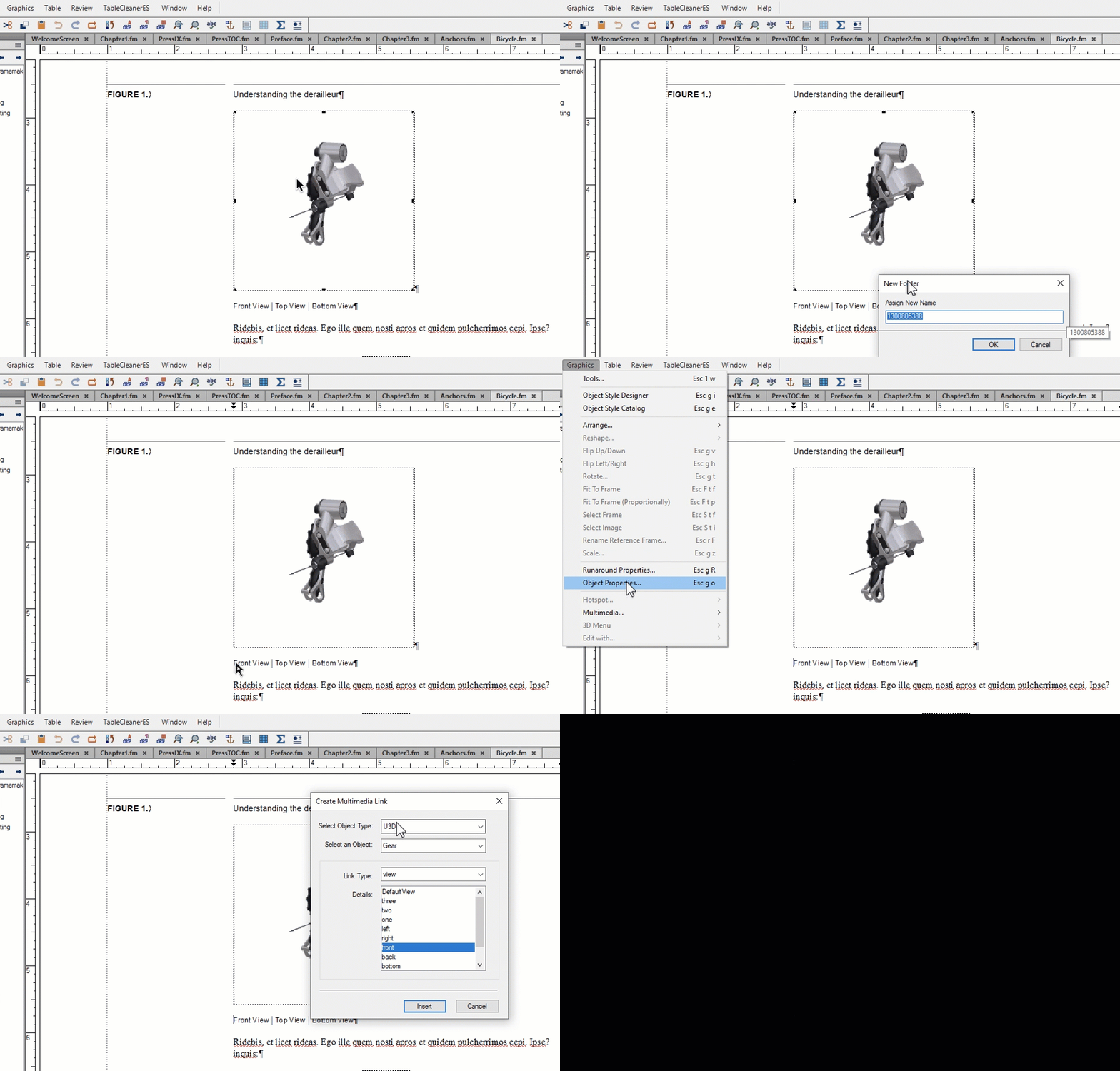
    This is the process I follow:

    • Select the image
    • Name the image
    • Click in the text (in this example, within the character style so that each instruction can be a different link)
    • Graphics > Multimedia >  Create Link to Graphic:
      • Object Type: U3D
      • Object: Gear (named in the earlier step)
      • Link Type: View
      • Details: Pick a view saved within the file. 


    If you are doing all of that, perhaps going on in the file. Is there another one you can experiment with? Be sure the views are saved in that U3D file.


    ~Barb 


    5 replies

    Barb Binder
    Community Expert
    Community Expert
    June 23, 2022

    Hi @retiredUSMC2011:


    We are always happy to help.


    ~Barb

    ~Barb at Rocky Mountain Training
    Barb Binder
    Community Expert
    Barb BinderCommunity ExpertCorrect answer
    Community Expert
    June 23, 2022

    Hi @retiredUSMC2011:


    This is the process I follow:

    • Select the image
    • Name the image
    • Click in the text (in this example, within the character style so that each instruction can be a different link)
    • Graphics > Multimedia >  Create Link to Graphic:
      • Object Type: U3D
      • Object: Gear (named in the earlier step)
      • Link Type: View
      • Details: Pick a view saved within the file. 


    If you are doing all of that, perhaps going on in the file. Is there another one you can experiment with? Be sure the views are saved in that U3D file.


    ~Barb 


    ~Barb at Rocky Mountain Training
    retiredUSMC2011
    Inspiring
    June 23, 2022

    Barb,

    Ok...I think I have it figured out. I assumed Graphics - Mutimedia - Create links to Graphics would IMPORT the file I want. Turns out I have to Import the file into an anchored frame first, then I can perform the Graphics - Mutimedia - Create links to Graphics. That is what I was missing. Silly me.

    Now to find a, posibly free, CAD program that will convert STP file to U3D.


    Thank you very much for your assistance and finding my misunderstanding of the process.

    Barb Binder
    Community Expert
    Community Expert
    June 23, 2022

    Before we get to reinstallation, can you let me know what the file format is that you're trying to add to the FrameMaker document? And you're using File > Import > File, is that correct?


    ~Barb

    ~Barb at Rocky Mountain Training
    retiredUSMC2011
    Inspiring
    June 23, 2022

    Barb,

    The instructions I used are in the User Guide page 386. They were:  Click on Graphics - Multimedia - Create Link to Graphic. Then a dialog window was to open to allow me to select my graphics file. Instead I got the error message. This will be a U3D file to allow for user interaction of that 3D object. But I can't even get the dialog window to appear to allow me to select the file.

    LinSims
    Community Expert
    Community Expert
    June 23, 2022

    Should have known to keep my nose out of this. Listen to Barb, she knows.

    Barb Binder
    Community Expert
    Community Expert
    June 22, 2022

    Hi @retiredUSMC2011:


    What is the file format of the 3D graphic? I believe the view controls are only for SWF and U3D.


    Are you trying to set up a link from words the page to control the view of the file in a PDF? As a quick reminder, you don't actually have to add a link in Fm. If you have a 3-D file in an Fm document and you export to PDF, after you give it permission, Acrobat will allow the user to interact with the 3-D object. 


    This toolbar is enabled in Acrobat/Reader after you "Click to Activate" and give permission to trust the file. 


    ~Barb

    ~Barb at Rocky Mountain Training
    retiredUSMC2011
    Inspiring
    June 23, 2022

    Barb,

    Framemaker does not give me the opportunity to select a multimedia/graphic file. The dialog window I mentioned at the beginning, immediately appears. The directions in the User Guide was very simple for me to follow. I am disappointed that it did not work. I was expecting a window to allow me to select the desired file, but got the error message instead.


    I wanted to learn something new and impress my co-workers. Wonder if there is something wrong with my installation of Framemaker?? 


    Thank you, ma'am.

    LinSims
    Community Expert
    Community Expert
    June 22, 2022

    What version of FrameMaker, what operating system, and what did you use to create the 3D view?

    retiredUSMC2011
    Inspiring
    June 22, 2022

    I knew I forgot to add something!

    Adobe Framemaker 2017 version 14.0.4.511

    ...not allowed to upgrade...darn it.