
Inspiring
April 18, 2024
Answered

Error when saving Framemaker books as PDF

  • April 18, 2024
  • 6 replies
  • 1370 views

For about 2 weeks now, we have been experiencing an error when writing books to PDF (Save as PDF). Previously it worked without any problems for months. The process now suddenly hangs at different times.
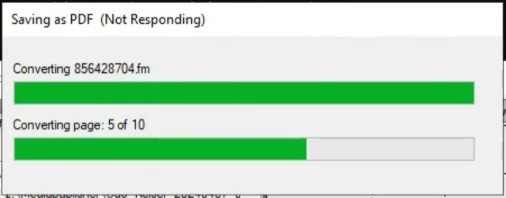
 

The CPU load increases sharply at this point. Even after hours, the situation does not change.
Unfortunately, there is no indication as to why the process is not continuing. The log file for the PDF writing suddenly ends without any indication of the problem.
The problem seems to be related to the referenced images in a cloud.
After several attempts, the process always stops at a different point. In rare cases (1 in 10) it also runs through to the end.
The error occurs in Framemaker 2019 (client and server) and also in Framemaker 2022 on several computers.
Is there any additional LOG information to narrow down the error or does anyone have an idea what the problem could be?

This topic has been closed for replies.
Correct answer Udo29519402o23a

Our IT department has now found a way for Framemaker to access the original image URLs of our DAM system directly without using the proxy server. This means that the problem no longer occurs when writing PDFs.
Thank you very much for your suggestions and help.

6 replies

Udo29519402o23aAuthorCorrect answer
Inspiring
April 24, 2024

Our IT department has now found a way for Framemaker to access the original image URLs of our DAM system directly without using the proxy server. This means that the problem no longer occurs when writing PDFs.
Thank you very much for your suggestions and help.

Bob_Niland
Community Expert
Community Expert
April 19, 2024

The alternatives of Publish, Print-to-PDF and Print-to-Ps&Distill might be worth a try.

To rule out the .book and .fm files themselves, try doing the Save-as with graphics turned off.
View🞃 View Options… ☐ Graphics

Copying everything to a local machine, with a mimic file system for the imports, might also single out problems.

Inspiring
April 19, 2024

Yes, that worked (see above). The problem with the transparencies and the automation prevents this approach.
I probably should have described the use case more precisely from the outset. I didn't want to make it too complicated. Sorry.

Community Expert
April 19, 2024

Why is it you are using Distiller? I suppose the images with transparacies are png files and FrameMaker can handle transparancy if you are not using Distiller. The Acrobat PDF printer driver is also just one of many PDF printerdrivers. It might be worth your while doing some experimentation with drivers from other companies. Microsofts PDF is actually quite good. It is simple and can not do complicated stuff, but it will work in most instances.

Regarding the pausing of the print jobs, my  money is absolutely on the "special setup" you have. An issue which has not been named here, is the restrain on url character numbers. Windows can not handle really long urls to images. I can't remember the actual number, but I have many times recieved jobs from customers where "something" was wrong, only to discover very deep folder hierarchies and folders with very long names. This will result in long - sometimes too long - urls.

Bjørn Smalbro - FrameMaker.dk
Matt-Tech Comm Tools
Community Expert
Community Expert
April 18, 2024

Slow networks and all manner of checkin/checkout software can prevent you from processing files on shared locations and networks.

You can see if the network location is causing the issue is to use File > Package to create a ZIP of your project, then unzip and see if the PDF process is working.

-Matt Sullivan, FrameMaker Course Creator, Author, Trainer, Consultant
Community Expert
April 18, 2024

If the files are linked into the document from different drives/folders outside of the FrameMaker folder, the package option will treat them as missing. Rick Quatros Archive script will work for this suggestion, though. Also a suggestion I would recommend actually 🙂

Bjørn Smalbro - FrameMaker.dk
Inspiring
April 19, 2024

We use this process automatically via scripting on the Framemaker server, so this solution is probably out of the question.
Thanks for the suggestion though.

Barb Binder
Community Expert
Community Expert
April 18, 2024

Can you elaborate on "referenced images in a cloud"? A cloud server like Dropbox?


~Barb

~Barb at Rocky Mountain Training
Inspiring
April 19, 2024

We work with a cloud-based digital asset management system. The images are delivered there via URLs and a content delivery network.
Unfortunately, it's still a bit more complicated.
In the company, we use a proxy server for Internet communication. I can't configure a proxy server for external image links in Framemaker.
We therefore use internal API management. The links are redirected in a slightly customized way via the API management and can thus be resolved. The problem occurs with these links.
I don't have a proxy server in the home office and can work with the original links. I have found that it works there.
If I could use Framemaker with the proxy, it would probably also work.

Matt-Tech Comm Tools
Community Expert
Community Expert
April 19, 2024

This sounds like an issue for your DAM

-Matt Sullivan, FrameMaker Course Creator, Author, Trainer, Consultant
Matt-Tech Comm Tools
Community Expert
Community Expert
April 18, 2024

It could be the location, but could also be the image. Try isolating the offending image by excluding half the book and producing the pdf. Once you have the file containing the issue, produce the pdf of that chapter. Then do something similar to identify the specific image in question. Replace that image or make it local on your computer to smooth out that issue.

-Matt Sullivan, FrameMaker Course Creator, Author, Trainer, Consultant
Inspiring
April 19, 2024

I don't think it's due to a single image, because the process always stops at a different point.
In a few cases it also runs through. It is always the same book.

Jeff_Coatsworth
Community Expert
Community Expert
April 18, 2024

Is your FM2022 up to date? Have you tried creating a PDF via the Print to Adobe PDF printer instance? The Save As and Publish routes both use the same new PDF engine in FM2022.

Inspiring
April 19, 2024

Yes I am using the latest Framemaker 2022 version.
I have just tried the printer instance and it worked.
Apparently the Distiller is used there, which unfortunately does not support transparencies in images.
This way is therefore not possible.