



ESTK - draw a graphic
Dear all,
After the first step (drawing a single line) I now try to draw a polyline. But i have no success:
- Obviously the defintion for the points is not correct
- Same is for the defintion of the dash pattern.
I tried to interprete the the FDK reference and the Scripting Guide - but I fail to transfer these definitions to JS data types.
FDK reference
F_PointsT: describes a set of coordinate pairs. It is normally used to describe the vertices of a graphic object, such as a polyline or polygon.
typedef struct {
UIntT len; /* Number of coordinate pairs */
F_PointT *val; /* Vector of coordinate pairs */
} F_PointsT;
Dash: Data type Metrics. Specifies a dash pattern that is repeated for the length of an object's border. The
pattern is stored in a MetricsT structure. The 0th element of the MetricsT.MetricsT_val array stores the length of the first dash; the 1st element
stores the following space; the 2nd element stores the next dash; and so on for an even number of elements.
Metrics: Under this heading some functions to handle metrics are given, but no explanation. I do not find a useful definition.
MetricsT structure: defined as
typedef struct {
UIntT len; /* Number of metric values*/
MetricT *val; /* Array of metric values */
} F_MetricsT;
Scripting Guide
Points: An Array of Point objects with integer indexing and a length property.
Point: is described just as two integer values x and y.
Dash: Same text as in FDK
Metrics: An Array of objects with integer indexing and a length property. ➔ what kind of objects?
This is my script
#target framemaker
var oDoc = app.ActiveDoc, cm = 1857713;
Main(oDoc);
function Main(oDoc) {
var oFrame, oLine1, oPoly1;
if (!oDoc.ObjectValid()) {
alert ("A document must be active.");
return;
}
oFrame = oDoc.FirstSelectedGraphicInDoc;
if (!oFrame.ObjectValid()) {
alert ("An anchored frame must be selected.");
return;
}
oPoly1 = DrawPoly(oDoc, oFrame);
}
function DrawPoly(oDoc, oFrame) {
var j, jLast, k, oPoly = oDoc.NewPolyline(oFrame), oPoints = [4, 1, 6, 2, 8, 1, 10, 2];
jLast = oPoints.length-1; // last index
for (j = 0; j <= jLast; j++) { // convert into internal units
oPoints
= oPoints * cm; }
oPoly.PolyIsBezier = 0; // 0: unsmooth; 1: smooth ?
oPoly.BorderWidth = 0.05*cm; // Stroke-width
oPoly.LocX = oPoints[0]; // otherwise has
oPoly.LocY = oPoints[1]; // precedence over 1st point
oPoly.Points = oPoints;
oPoly.Width = oPoints[jLast-1] - oPoints[0]; // object dimensions
oPoly.Height= oPoints[jLast] - oPoints[1]; // default : 1/4"
oPoly.Fill = 15; // Pattern: 0: filled, 7: white, 15: clear
oPoly.Color = 0; // black?
oPoly.Dash = [cm, 0.5, 0.5, 0.2, 0.2]; // ?
return oPoly;
}
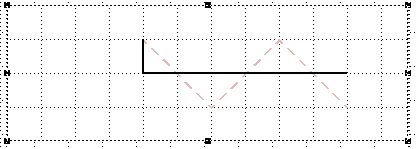
And this is the output
The red item is what I want to achieve and the black is what the script produces.


 AdChoices