Known Participant
August 6, 2021
Answered

exporting PDF, out of order "Contents"

  • August 6, 2021
  • 3 replies
  • 626 views

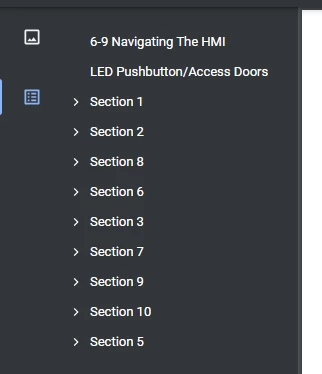
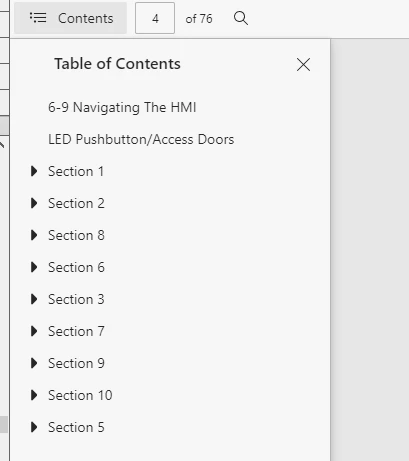
When i export to pdf and open the document in microsoft edge the contents is out of order, i am trying to correct this. My 130+ page document uses disconnected pages. I use stand-alone table of contents in the document. Any help is apprichiated.

Mircosoft Edge & Chrome Screenshots
 

    This topic has been closed for replies.
    Correct answer frameexpert

    The PDF bookmarks are going to basically follow the order of the FrameMaker TOC before you rearrange things. When making the TOC and bookmarks, FrameMaker processes one flow at a time. While your disconnected pages may have the same flow name (for example, A), they are internally considered as separate flows. Instead of disconnected pages, you may consider using separate documents and a FrameMaker book.


    I can script the TOC so it is always in the correct order, but if you are using FrameMaker 2019 or higher I can't script the bookmarks.

    3 replies

    Jeff_Coatsworth
    Community Expert
    Community Expert
    August 9, 2021

    Has this worked before for you? If so, what's changed? If not, then further drilling down will be necessary to figure out what's going on.

    beau5CC8Author
    Known Participant
    August 16, 2021

    No, its been out order always i believe, i am typically copying and pasting the text frame on each page instead of assigning master pages. Maybe the alterting to the toc make it impossible to have the correct order when viewing the contents?

    frameexpert
    Community Expert
    frameexpertCommunity ExpertCorrect answer
    Community Expert
    August 16, 2021

    The PDF bookmarks are going to basically follow the order of the FrameMaker TOC before you rearrange things. When making the TOC and bookmarks, FrameMaker processes one flow at a time. While your disconnected pages may have the same flow name (for example, A), they are internally considered as separate flows. Instead of disconnected pages, you may consider using separate documents and a FrameMaker book.


    I can script the TOC so it is always in the correct order, but if you are using FrameMaker 2019 or higher I can't script the bookmarks.

    Jeff_Coatsworth
    Community Expert
    Community Expert
    August 6, 2021

    Ok, so you're manually mucking around making up a TOC (why, when FM's so good at building them automatically?) - what's the "Final TOC" image from FM look like in the PDF?
    OR, what's the section you show out of order in the PDF look like in the FM TOC?
    Always helps to look at apples to apples to spot what might be going on. You still haven't explained why you use disconnected pages - what is it accomplishing for you? (never needed to ever use them myself)

    beau5CC8Author
    Known Participant
    August 6, 2021

    i have to "muck" the table of contents this way because of the way i am displaying the text. my toc always appears in order with no problems.i find it off that random sections are appearing before the section 1, and when i open each section its highly inaccurate. I use disconnected pages due to the way i construct the documents and mass deletion of pages without interferring with a huge workflow. Hard to explain.. hoping there is a easy fix for this.

    Jeff_Coatsworth
    Community Expert
    Community Expert
    August 6, 2021

    What's your FM TOC look like (and why the disconnected pages?)

    beau5CC8Author
    Known Participant
    August 6, 2021

    I use these for the descriptions on top of the page.


    Section 1=Body Section

    Section 2=Body Title

    Section 3=Body title Tag


    I modify the section 3 body title tag to include "1-1" before it. Because safety is simple the section description. if this makes sense. then my take of contents begins to look like this.


    before editing like this line displayed it looks like a mess like this.


    beau5CC8Author
    Known Participant
    August 6, 2021

    Final TOC looks like this