

Ian Proudfoot
Legend
April 6, 2020
Answered

ExtendScript Debugger for VSCode: Unable to include script references

  • April 6, 2020
  • 5 replies
  • 5656 views

I have tried to move an old project from the ESTK into VSCode. While it's generally more difficult to set-up a project, once it is working I think that VSCode is a real improvement on the ESTK. However, I need to debug a script that includes other scripts. In the ESTK I can use #include script_name.jsx

This gives a couple of errors for each use in VSCode:
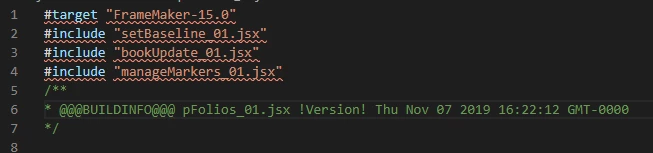


  • Private identifiers are not allowed outside class bodies.
  • ';' expected.

What am I missing? Hopefully it's an easy one to fix, I've not found any reference to private identifiers in my JavaScript or ExtendScript documentation.

Ian

This topic has been closed for replies.
Correct answer Klaus Göbel

Hi Ian,

try it this way: "//@include" instead of "#include"

5 replies

Klaus Göbel
Legend
April 7, 2020

I have experienced something similar.
But that was mostly when there was a certain script error, like editing TextItems and setting the wrong offset or something similar.

In the meantime I have adapted my scripts to not create the most beautiful and shortest code, but to create the code in a way that I can debug most easily.
So there are several temporary variables that I can query easily and quickly

If you have script snippets, that force ESTK to crash, you could send it for testing purposes to me via PM.


4everJang
Legend
September 22, 2021

The BIG problem with ESTK is that it is no longer developed, meaning it will not work on my new 64-bit Windows machine. So I am forced to move to Visual Studio Code. After some hassle I got a basic setup working but unfortunately there is no live Object browser. I might have to write one in ExtendScript myself...


Once I get a working VSCode based system up and running I will start a new thread - or maybe a blog on one of my websites - to inform other scripters about the tricks to use. As ESTK development is dead, there really is no other choice than either moving to VSCode or giving up on scripting altogether.

4everJang
Legend
September 22, 2021

I am wondering who came up with the crazy //@include convention for Javascript in VSCode. It does work but now I need to write // //@include "some_file.jsx" to disable it and both lines are shown in green, as the editor sees both as comments. Please, VSCode developers, switch your brains on before you come up with the next great idea...  

Klaus Göbel
Legend
April 7, 2020

Hi Ian,

I've tried it and I quit 😉


It makes debugging so much harder. And there is no progress since weeks (months).

And I don't want to waste my time. I had high hopes for myself, but now I've been returned to ESTK.

I drop in here from time to time, but nothing seems to change here.

Ian Proudfoot
Legend
April 7, 2020

Yes Klaus, I think that I am close to quitting. I chose this relatively quiet time to make the switch to VSCode, but it has been a disappointing experience. 
On a recent project I found the ESTK to be constanly 'going dead'. That is showing no signs of crashing, but only the user interface remaining responsive. Each time I would have to restart the ESTK and hope I had lost nothing.

Ian

Klaus Göbel
Legend
April 7, 2020

Hi Ian,

it is not documented. I've got the answer from another (prerelease-)forum.

(https://forums.adobeprerelease.com/exmancmd/categories/estkvsc)


You can subscribe here: https://www.adobeprerelease.com/


Ian Proudfoot
Legend
April 7, 2020

Thanks for the link Klaus. Some very interesting information in there. Some of it makes me think that I should stay with the ESTK rather than make the jump to VSCode...

Ian Proudfoot
Legend
April 7, 2020

Thank you Klaus!

For future reference where is this documented?

Ian

Klaus Göbel
Klaus GöbelCorrect answer
Legend
April 6, 2020

Hi Ian,

try it this way: "//@include" instead of "#include"