
Known Participant
June 21, 2021
Answered

ExtendScript doesn't work consistently

  • June 21, 2021
  • 4 replies
  • 773 views

I have a really strange situation. I have an ExtendScript that works on all but one document. They all have the same template, same tags, same layout, etc. I'm using unstructured FM 2019 in Windows 10 on a PC. Has anyone run into something like this before? Is there something in FM that I should be looking for that would cause this? I don't see anything different, there shouldn't be anything different, but evidently there is. It's very frustrating. 
This topic has been closed for replies.
Correct answer frameexpert

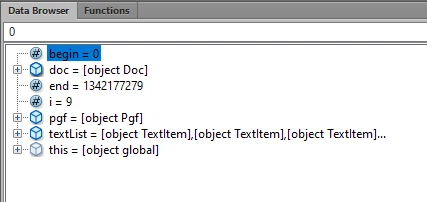
In the data browser box in ExtendScript, it shows this when it hangs up:

i = 9. Is that what you mean?


No, the variable num.

Your getFigOrTable function only returns num if the regular expression matches. Otherwise, it returns undefined, which is why num.index is failing. You need some kind of test for num after you call getFigOrTable:

if (!num) { // undefined

    return; // Don't do anything else.

}

or

if (num) { // Returned a regex match.

    begin = num.index;

    // etc.

}

4 replies

jmyers2Author
Known Participant
June 22, 2021

The message in ExtendScript is "undefined is not an object" and it locks up FM.

Bold is a character format that does exist in the document.

frameexpert
Community Expert
Community Expert
June 22, 2021

It should give you a line number, which will usually be one off. What is on the line it reports? Or a few lines in either direction?

jmyers2Author
Known Participant
June 22, 2021

The red text is where ES stops running.


function boldTheText (pgf, doc) {

var end = Constants.FV_OBJ_END_OFFSET - 1, begin = 0, textRange, charTag;

var textList = pgf.GetText (Constants.FTI_String);
for (var i = textList.length - 1; i >= 0; i -= 1)
{
num = getFigOrTable (pgf);
begin = num.index;
end = begin + num[0].length;

textRange = new TextRange (new TextLoc (pgf, begin), new TextLoc (pgf, end));
applyCharFmt (textRange, "Bold", doc);
}

}

jmyers2Author
Known Participant
June 22, 2021

The script goes through my document, looks for specific paragraph styles, and then bolds certain words in the paragraph. (I was able to put it together using pieces of other scripts that I had lots of help from from you folks in the forum. 🙂 ) The red text below is where it breaks down.  Like I said, it works in all the documents except one, so I figure it must be something in the document.


#target framemaker
main ();

// Check for an open document
function main () {
var doc;

doc = app.ActiveDoc;
if (doc.ObjectValid () === 1) {
processDoc (doc);
}
else {
alert ("There is no active document.");
}
}

function processDoc (doc) {
var pgfRegex, pgf;

// Turn off the displaying property to speed the script and prevent flicker.
if (app.Displaying === 1) {
app.Displaying = 0;
}
pgf = doc.FirstPgfInDoc;
// Match CaptionFigure and CaptionTable paragraph formats.
pgfRegex = /^(CaptionFigure|CaptionTable|CaptionPlate)$/;

while (pgf.ObjectValid () === 1) {
if (pgfRegex.test (pgf.Name) === true) {
boldTheText (pgf, doc);
}
pgf = pgf.NextPgfInDoc;
}

// Restore the document's display and refresh the screen.
if (app.Displaying === 0) {
app.Displaying = 1;
doc.Redisplay ();
alert("Text is bolded");
}
}
function boldTheText (pgf, doc) {

var end = Constants.FV_OBJ_END_OFFSET - 1, begin = 0, textRange, charTag;

var textList = pgf.GetText (Constants.FTI_String);
for (var i = textList.length - 1; i >= 0; i -= 1)
{
num = getFigOrTable (pgf);
begin = num.index;
end = begin + num[0].length;

textRange = new TextRange (new TextLoc (pgf, begin), new TextLoc (pgf, end));
applyCharFmt (textRange, "Bold", doc);
}

}


function getFigOrTable (pgf) {

var doc;

doc = app.ActiveDoc;

var regex, pgfText, match;

regex = /(?:Figure|Table|Plate) ((AF|AT|[FTP])(\d+)([.]| [(]continued[)][.]))/; // Match figure or table and number in text.

pgfText = getText (pgf, doc);

if (regex.test (pgfText) === true) {

match = pgfText.match (regex);

return (match);

}

}


function getText (textObj, doc) {

// Gets the text from the text object or text range.

var text = "", textItems, i;

// Get a list of the strings in the text object or text range.

if (textObj.constructor.name !== "TextRange") {

textItems = textObj.GetText(Constants.FTI_String);

} else {

textItems = doc.GetTextForRange(textObj, Constants.FTI_String);

}

// Concatenate the strings.

for (i = 0; i < textItems.len; i += 1) {

text += (textItems[i].sdata);

}

return text; // Return the text

}


function applyCharFmt (textRange, name, doc) {

var charFmt = 0;

charFmt = doc.GetNamedCharFmt (name);

if (charFmt.ObjectValid()) {

doc.SetTextProps (textRange, charFmt.GetProps());

}

}

Bob_Niland
Community Expert
Community Expert
June 22, 2021

Can't help much with the script code, but:

  • What does "breaks down" mean?
    Does nothing?
    Throws error?
    Crashes entire internet?
  • Is the Bold being applied a named Character Format, or just an override?
    If named, does the ChFmt exist in the doc?
    If override, is Bold available for the font used?
frameexpert
Community Expert
Community Expert
June 21, 2021

As Bob said, we will definitely need more details about the script what it is supposed to do.

Bob_Niland
Community Expert
Community Expert
June 21, 2021

The forum has a number of scripters [and I'm not one]. Several are professional. They run into odd issues [some real bugs], but I'm going to guess that they'll need more info to be of help, starting with:
• what is the function of the script?
• what is the failure mode?