Inspiring
January 24, 2017
Answered

extra page in framemaker 10

  • January 24, 2017
  • 2 replies
  • 751 views

I have a chapter file with a blank page at the end. There is definitely no text on the Body page. There's a header on the Master page.

I have tried deleting the last page, but it reappears when I save or print.

I'm guessing it has something to do with the master page, but I don't know what exactly.

This topic has been closed for replies.
Correct answer Barb Binder

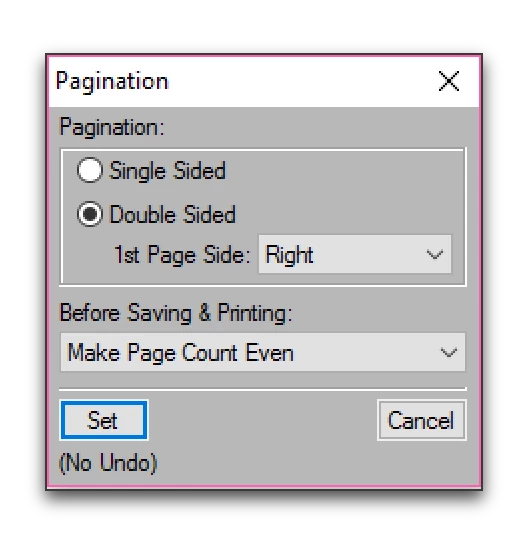
I agree with checking Pagination, but if you need a double-sided document, leave that setting alone. Instead, direct your focus to Before Saving and Printing. What does it say?

Note that you can do this at the document level, but it's easier, IMHO, to handle pagination settings at the book level, because you can manage them all at one time.

2 replies

Barb Binder
Community Expert
Barb BinderCommunity ExpertCorrect answer
Community Expert
January 24, 2017

I agree with checking Pagination, but if you need a double-sided document, leave that setting alone. Instead, direct your focus to Before Saving and Printing. What does it say?

Note that you can do this at the document level, but it's easier, IMHO, to handle pagination settings at the book level, because you can manage them all at one time.

~Barb at Rocky Mountain Training
Inspiring
January 24, 2017

Ah! It says Make Page Count Even, which is probably making it add a page. I can set that to Delete Empty Pages.

Barb Binder
Community Expert
Community Expert
January 24, 2017

Perfect!

~Barb at Rocky Mountain Training
K.Daube
Community Expert
Community Expert
January 24, 2017

Ted,

Most likely in Format > Page Layout > Pagination the setting is Double sided.

If you have a single page only document this will always save and print 2 pages (recto, verso)

Inspiring
January 24, 2017

I have three pages of content in the chapter.