
effolsom
Inspiring
October 20, 2016
Answered

Extra text flows around tables in document imported from Word

  • October 20, 2016
  • 2 replies
  • 220 views

Hi Folks,

I'm trying to set up a reproducible process for importing all our Word files into FrameMaker. I've got it mostly done (thanks largely to tips found here!) but am still struggling with getting the tables to come over well.

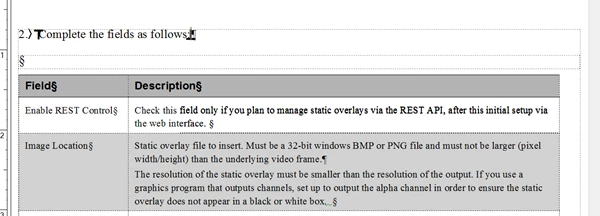
My problem is that the table seems to show up in its own flow, which results in more space than I want between the the table and the paragraph above it.  Is there a way to either import it in the same flow as the main text or to move all the content into a single flow after the import? Screenshot attached.
This topic has been closed for replies.
Correct answer effolsom

OK, that^ wasn't the answer. The problem was not a text flow but a text /frame/, which FM was putting in for a table title. To get rid of it, I just edited the table format definition (Table>Format>Table Designer) and changed the Title dropdown from Above Table to No Title.

2 replies

effolsom
effolsomAuthorCorrect answer
Inspiring
October 20, 2016

OK, that^ wasn't the answer. The problem was not a text flow but a text /frame/, which FM was putting in for a table title. To get rid of it, I just edited the table format definition (Table>Format>Table Designer) and changed the Title dropdown from Above Table to No Title.

effolsom
effolsomAuthor
Inspiring
October 20, 2016

I just found a solution. Posting it here in case it helps someone else!

The trick--have the FrameMaker converter remove extra paragraph breaks. (Click the Advanced button on the Word Import dialog, check Empty Paragraphs.)