
Known Participant
January 11, 2010
Question

FDK: Table duplication after cut n' paste

  • January 11, 2010
  • 1 reply
  • 1959 views

Hi there

I'm having a strange problem when cutting and pasting tables using the FrameMaker Development Kit. Basically, I'm trying to translate FM docs using a client application. The client app deletes all the text in a document, and replaces it with its translated equivalent. Unfortunately, this requires repositioning certain anchors if they are contained within paragraphs, because if an anchor is at the end of a paragraph, the deletion of text will move it to the start of the paragraph, and then when we add translations, the new text will be placed after the anchor. So I cut and paste the anchors programmatically, and for the majority it works perfectly. However, in a couple of documents, when the paste is completed and the file is saved, I reopen the doc to find a table has been duplicated 6 or 7 times consecutively and I'm not sure why - see below:
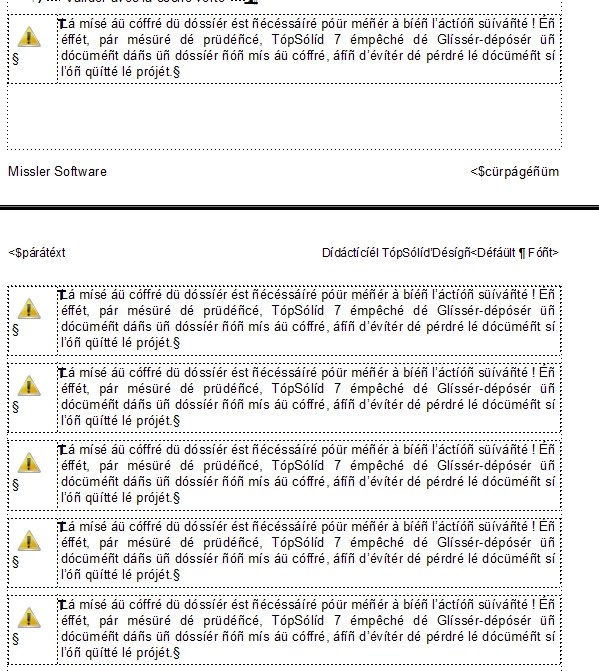
We calculate the table anchor's new position by keeping track of the length of the new text and any anchors which come before the table anchor. The fact that the first of the multiple anchors is in the right location tells me I'm doing something right, but I need to resolve this issue completely as it causes serious headaches for our customers. Any insight would be much appreciated.

Thanks

Eric

    This topic has been closed for replies.

    1 reply

    Legend
    January 11, 2010

    Hi Eric,

    Didn't we solve this problem already?  Maybe I'm thinking of one of your many other table struggles

    Here are some musings... I am gathering that the "repositioning" routine is a post-processing step, run after all the text is replaced. If that is true, I am guessing that you simply step through all the tables in the doc and to a cut/paste to move them to the end of their respective paragraphs.

    If all of this is still true, how are you stepping through the tables? Are you doing some kind of loop starting with a FP_FirstTblInDoc (or similar property), then iterating along FP_NextTblInDoc until you get to the end?  If so, perhaps the cut/paste action is rearranging the list of table IDs within FrameMaker, causing some nature of higgley-piggley in what would otherwise seem like a linear operation. Offhand, I can't envision a scenario where this would cause table duplication, but I've seen stranger things happen so it might be something to look at. If you wanted to see if list rearrangement is the problem, you could make your own list with an F_Ints array ahead of time and iterate through that, rather than FrameMaker's internal list.

    My suspicion is that whatever the problem, you'll probably find the source to be a failed cut action, in which case the original clipboard is maintained and for some reason pasted at the most recent text location. In other words, I don't think the problem lies with extra paste actions. I bet that if you have a table duplicated 6 times, there may be 6 six tables in the doc that were actually not processed. Somehow the action on another table is failing and just being repeated on the previous table.

    All just speculation here, of course. If none of these ideas are quite right, maybe they can at least nudge you in the right direction.

    Russ

    eric247Author
    Known Participant
    January 12, 2010

    Hi Russ

    Thanks for you reply. Yes I apologise, my posts have all been variations on a theme (i.e. tables ) .

    I thought I solved this problem last time, but the text runaround issue from my previous post seems to be causing

    our customers DTP headaches. There is really one scenario I wish to cater for - a paragraph which has a table anchor after the last character

    of text. If an anchor is at the start, then there is no work to be done. I'm not sure what happens if there is a table in the middle of a paragraph,

    or if that's even possible, maybe FrameMaker treats table anchors as paragraph end delimiters.


    As you correctly guessed, our program re-positions tables as a post processing step - the text is already translated by the time we get round to doing it.

    As I mentioned in a previous post, when we parse the FM file initially , we record the type and id of all the non-textual objects in the document using special "tags". When we write out the translations we use the tags to reset the objects into the document. With tables, we use the following struct:

    struct Anchor
    {
        int m_nObjectType;
        int m_nUID;
        F_ObjHandleT m_nPgf;
        int m_nOffset;
    };

    When we hit a "table" tag, we create a new Anchor object and push it onto a vector like so:

    else if (pTag->GetText().Compare(L"table") == 0)
    {
           Anchor a;
           a.m_nObjectType = FO_Tbl;
           a.m_nUID = _wtoi(pTag->GetAttribute(0)->GetValue());
           a.m_nPgf = hParagraph;
           a.m_nOffset = nTextOffset;


           m_aObjectsToMove.push_back(a);
           //m_aObjectsToMove stores objects which need
           //to be repositioned due to the cutting of text
           //affecting their location
    }

    Then, once all the text magic is done, we reposition as follows:

    int o = 0;
    const int nMoveCount((int)m_aObjectsToMove.size());
    while(o < nMoveCount)
    {
        Anchor a = m_aObjectsToMove;
           
        F_ObjHandleT hAnchor = F_ApiGetUniqueObject(m_hDocument, a.m_nObjectType, a.m_nUID);


        F_TextRangeT textRange, paraTextRange;
        textRange.beg = F_ApiGetTextLoc(m_hDocument, hAnchor, FP_TextLoc);
        paraTextRange.beg = F_ApiGetTextLoc(m_hDocument, a.m_nPgf, FP_TextLoc);
       

         /* does the anchor' s current location differ
        from the location it was in when pushed into m_aObjectsToMove?


        If not don't move it!
        Problems will arise if anchors
        are cut from a paragraph which
        has no other content


        We never have to worry about this
        because in an empty paragraph
        an hAnchor tag cannot be moved
        */
        if (textRange.beg.offset != a.m_nOffset)
        {
            textRange.end.objId = textRange.beg.objId;
            textRange.end.offset = textRange.beg.offset+1;


            // Select the object
            if (a.m_nObjectType == FO_Tbl)
            {
                F_ApiMakeTblSelection(m_hDocument, hAnchor, FF_SELECT_WHOLE_TABLE, 0, 0, 0);
            }
            else
                F_ApiSetTextRange(FV_SessionId, m_hDocument, FP_TextSelection, &textRange);


            F_ApiCut(m_hDocument, FF_CUT_TBL_CELLS);
               
            F_TextRangeT newRange;
            newRange.beg.objId = a.m_nPgf;
            newRange.end.objId = a.m_nPgf;
            if (a.m_nOffset > 0)
            {
                newRange.beg.offset = a.m_nOffset-1; //<-- why is this needed - EricC
                newRange.end.offset = a.m_nOffset-1; //..........................
            }
            else
            {
                newRange.beg.offset = a.m_nOffset;
                newRange.end.offset = a.m_nOffset;
            }


            // Paste the hAnchor into its new position
            F_ApiSetTextRange(FV_SessionId, m_hDocument, FP_TextSelection, &newRange);
            F_ApiPaste(m_hDocument, FF_REPLACE_CELLS);
        }


        o++;
    }

    What you said about failed cutting operations is interesting - is there any way to tell when one fails?

    One interesting thing to note is that when our application is changing an FM doc, we have FM launched in such a way that you can see the changes being made in front of you. When the cutting and pasting takes place, the tables look fine, its only when we open the document after being saved the issue becomes visible.

    Thanks

    Eric

    Legend
    January 12, 2010

    Hi Eric,

    Thanks for the extended explanation. I see that your routine for iterating over tables is more sophisticated than a simple walk through an internal FrameMaker list, so disregard that part about list order.

    Looking at the code, I still think that there is a possibility that somehow you are ending up with bogus (or if not bogus, unwanted) members within m_aObjectsToMove. My theory is that if you provide information that is invalid for F_ApiCut(), the operation will silently fail and the original clipboard will be maintained. Then, maybe the F_ApiSetTextRange() behaves the same way and the original text selection is unaltered. By the time you get to F_ApiPaste(), the effect is as if you manually selected Edit > Paste with the insertion point in the same place as before, with the same table on the clipboard as before.

    What I think you should do is put in some checks for the global FA_errno variable after each critical step, such as the cut and also the text selection. This is good practice for any cut/paste operation because a silent failure can cause unexpected results, a fact whether or not this is the source of your troubles at this point. Any time there is some sort of internal error, Frame assigns an error constant to FA_errno which can be compared against the constants in the dev ref to find out more info on the nature of the error. Note that FA_errno is never automatically reverted to a successful state, so you would want some sort of reset statement before each applicable operation, such as:

    FA_errno = FE_Success;

    F_ApiCut(m_hDocument, FF_CUT_TBL_CELLS);

    if(FA_errno != FE_Success)

    {  /* some code to handle the error and abort the paste */ }

    In all cases, I'm nearly certain that an FA_errno error after F_ApiCut() means that the cut operation failed and the original clipboard is unaltered, in which case you definately want to abort F_ApiPaste(). So, that's my next suggestion... put some checks in there to see if the cut is failing at any stage. If you find that this is not the case and the cut always succeeds, we may not have solved the problem but you will at the least have code that is more reliable.

    As far as the save/reopen thing, something sounds like a red herring there. Sometimes things go on that you can't see. As an experiment, are you able to skip the document close at the end to examine the results, before reopening the file?

    Russ