
Participant
October 11, 2017
Answered

Fetching AFrame for each page

  • October 11, 2017
  • 1 reply
  • 736 views

Hi,

I want to fetch all Aframes information in an active doc whose layout has three columns for each page.
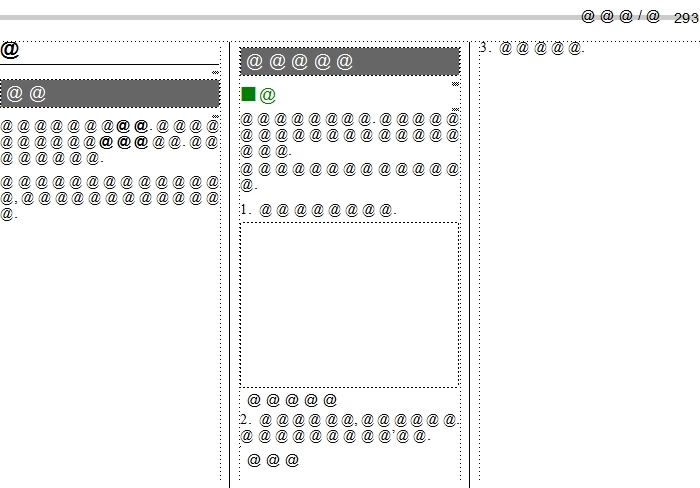
I wrote the code below:

#target framemaker 

var doc = app.ActiveDoc;

if (doc.ObjectValid() == true) {

    var page = doc.FirstBodyPageInDoc;

    while (page.ObjectValid()) {

        var graFrame = page.PageFrame.FirstGraphicInFrame;

        while (graFrame.ObjectValid()) {

            var subcol = graFrame.FirstSubCol;

            while (subcol.ObjectValid()) {

                var aFrame = subcol.FirstAFrame;

                while (aFrame.ObjectValid()) {

                    alert(page.PageNum + " " + aFrame.Width); // display Info about Aframe

                    aFrame = aFrame.NextAFrame;

                }

                   subcol = subcol.NextSubCol;

            }

            graFrame = graFrame.NextGraphicInFrame;

        }

        page = page.PageNext;

    }

}

This code does not work correctly.

Alert message like below;

-----------------------------

0 1000

0 2000

1 2000

-----------------------------

The second alert, "0 2000" is undesirable, because this information about Aframe on page 1.

"var subcol" ignores the page.

Could you teach me how to fix it, please?

Thanks,

Koji Koike

This topic has been closed for replies.
Correct answer frameexpert

I would do something like this:

#target framemaker

var doc = app.ActiveDoc;

var flow = doc.MainFlowInDoc;

var textList, i, aframe, page;

// Get a list of anchored frame text items in document order.

textList = flow.GetText (Constants.FTI_FrameAnchor);

for (i = 0; i < textList.length; i += 1) {

    // Get the anchored frame object.

    aframe = textList.obj;

    // Get the page that contains the anchored frame.

    page = getAFramePage (aframe);

}

function getAFramePage (aframe) {


    var textFrame, uframe, page;


    textFrame = aframe.InTextFrame;

    uframe = textFrame.FrameParent;

    page = uframe.PageFramePage;

    return page;

}

1 reply

frameexpert
Community Expert
Community Expert
October 11, 2017

Are all of the anchored frames in the document's main text flow? Or are some of them in tables? Do you have to process the anchored frames in document order or can you process them in in any order? If you can answer these questions, I can give you some help. Thanks.

www.frameexpert.com
KeKeJAuthor
Participant
October 12, 2017

> Are all of the anchored frames in the document's main text flow?

Yes, all of them in a document's main text flow.

>Do you have to process the anchored frames in document order

Yes, I just want to collect information about width of anchored frames, in page sequence.

The following is the solution I considered.

...................................................................

            var subcol = graFrame.FirstSubCol;

            while (subcol.ObjectValid()) {

                var aFrame = subcol.FirstAFrame;

                while (aFrame.ObjectValid()) {

                    alert(page.PageNum + " " + aFrame.Width); // display Info about Aframe

                    aFrame = aFrame.NextAFrame;

                }


                // Below lines are the solution not to go subcol.NextSubCol on next page.

                // first column's LecX value is 1857710.

                if (subcol.NextSubCol.LocX == 1857710) {

                    break;

                } else {

                    subcol = subcol.NextSubCol;

                }   

...................................................................

But, it is not smart, I think.

If you have better way to solve, please teach me.

Thanks.

frameexpert
Community Expert
frameexpertCommunity ExpertCorrect answer
Community Expert
October 12, 2017

I would do something like this:

#target framemaker

var doc = app.ActiveDoc;

var flow = doc.MainFlowInDoc;

var textList, i, aframe, page;

// Get a list of anchored frame text items in document order.

textList = flow.GetText (Constants.FTI_FrameAnchor);

for (i = 0; i < textList.length; i += 1) {

    // Get the anchored frame object.

    aframe = textList.obj;

    // Get the page that contains the anchored frame.

    page = getAFramePage (aframe);

}

function getAFramePage (aframe) {


    var textFrame, uframe, page;


    textFrame = aframe.InTextFrame;

    uframe = textFrame.FrameParent;

    page = uframe.PageFramePage;

    return page;

}

www.frameexpert.com