
Figure Titles Get Pushed to Next Page
So I'm using structured FM, and I've noticed that when I have a figure on one page and a table on the next page, the figure title gets pushed down to the next page (see attached image).
Why is this happening? How can I fix it?
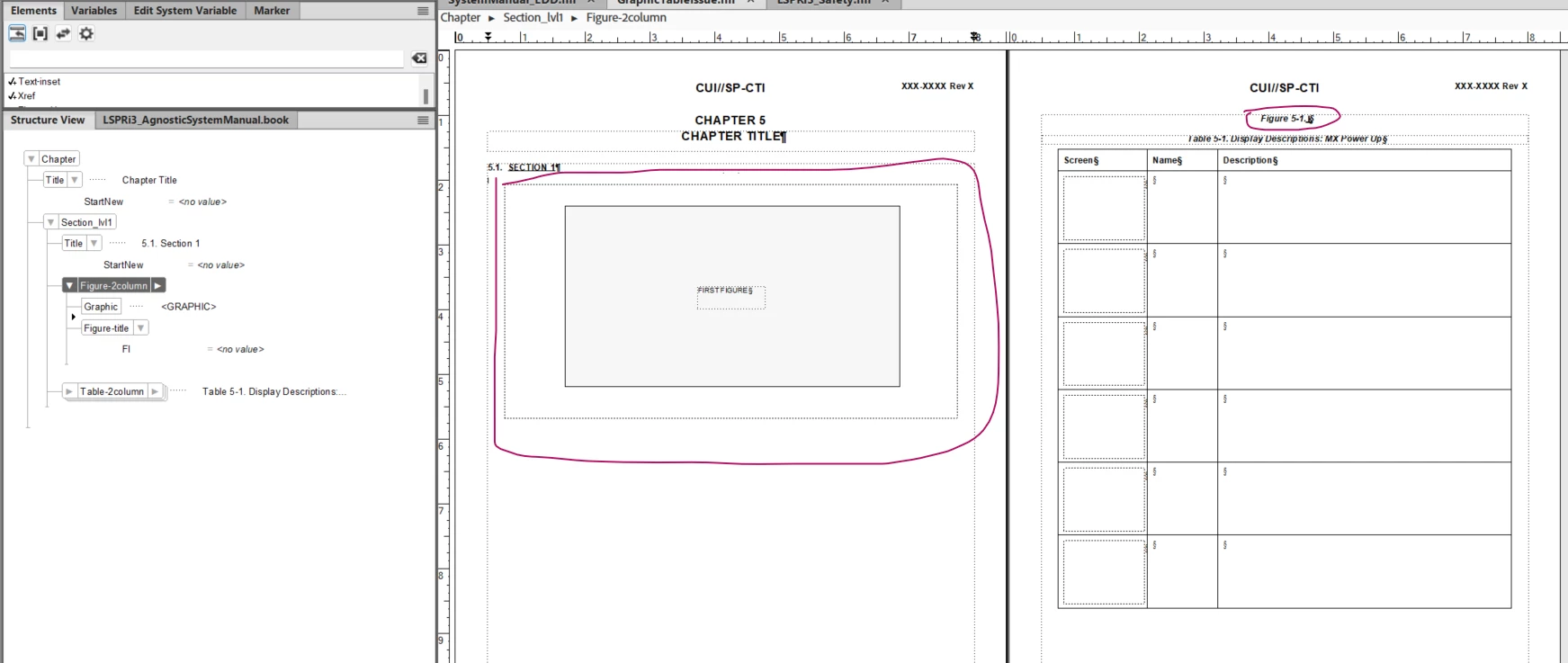
Here's my Figure element
Element (Container): Figure-2column
General rule: Graphic, Figure-title
Attribute list
Name: StartNew Choice Optional
Choices: Page, Column, None
Name: KeepWithPrevious Choice Optional
Choices: Yes, No
Automatic insertions
Automatically insert child: Figure-title
Text format rules
In all contexts.
Numbering properties
No autonumber format.
Default font properties
Size: 6pt
Pagination properties
Placement: Across all columns
Keep with next: No
If context is: [StartNew=”Page”]
Pagination properties
Start position: Top of page
Else, if context is: [StartNew=”Column”]
Pagination properties
Start position: Top of column
Else
No additional formatting.
If context is: [KeepWithPrevious=”No”]
Pagination properties
Keep with previous: No
Else, if context is: [KeepWithPrevious=”Yes”]
Pagination properties
Keep with previous: Yes
Else
Pagination properties
Keep with previous: No
And the Figure title:
Element (Container): Figure-title
General rule: (<TEXT> | FI-title | FI-sheetNum)*
Attribute list
Name: ID Unique ID Optional
Control flags: Read-only, Hidden
Name: FI Choice Optional
Choices: First, Continued, None
Text format rules
In all contexts.
Default font properties
Size: 10pt
Weight: Bold
Angle: Italic
Family: Arial
Case: Normal
Basic properties
Alignment: Center
Paragraph spacing
Space above: 11pt
Line spacing
Height: 11pt
Numbering properties
Autonumber format: F:Figure <$chapnum>-<n+>.
If context is: [FI=”Continued”]
Numbering properties
No autonumber format.
Else
No additional formatting.
Here's my Table element:
Element (Table): Table-2column
General rule: (Table-title)*, (TableHead)*, TableBody
Attribute list
Name: StartNew Choice Optional
Choices: Page, Column, None
Name: Textalign Choice Optional
Choices: Left, Right, Center
Name: KeepWithPrevious Choice Optional
Choices: Yes, No
Text format rules
If context is: [StartNew=”Page”]
Pagination properties
Start position: Top of page
Else, if context is: [StartNew=”Column”]
Pagination properties
Start position: Top of column
Else
No additional formatting.
If context is: [Textalign=”Left”]
Basic properties
Alignment: Left
Else, if context is: [Textalign=”Right”]
Basic properties
Alignment: Right
Else, if context is: [Textalign=”Center”]
Basic properties
Alignment: Center
If context is: [KeepWithPrevious=”No”]
Pagination properties
Keep with previous: No
Else, if context is: [KeepWithPrevious=”Yes”]
Pagination properties
Keep with previous: Yes
Else
Pagination properties
Keep with previous: No
In all contexts.
Pagination properties
Placement: Across all columns
And the Table title:
Element (Table Title): Table-title
General rule: <TEXT>
Attribute list
Name: ID Unique ID Optional
Control flags: Read-only, Hidden
Text format rules
In all contexts.
Default font properties
Angle: Italic
Family: Arial
Weight: Bold
Basic properties
Alignment: Center
Numbering properties
Autonumber format: T:Table <$chapnum>-<n+>.


 AdChoices