Inspiring
August 6, 2020
Answered

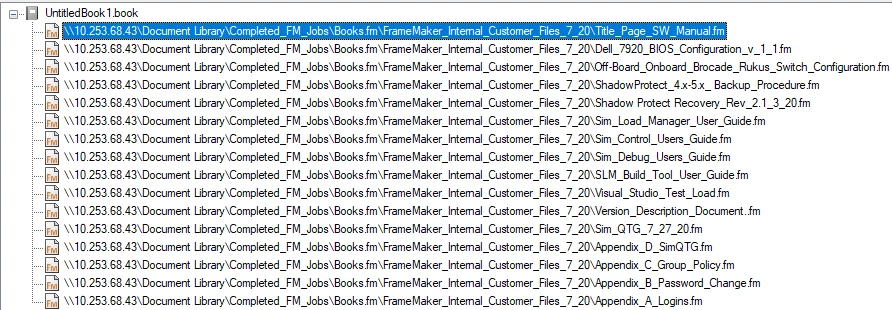
File name view when building book files.....

  • August 6, 2020
  • 1 reply
  • 1389 views

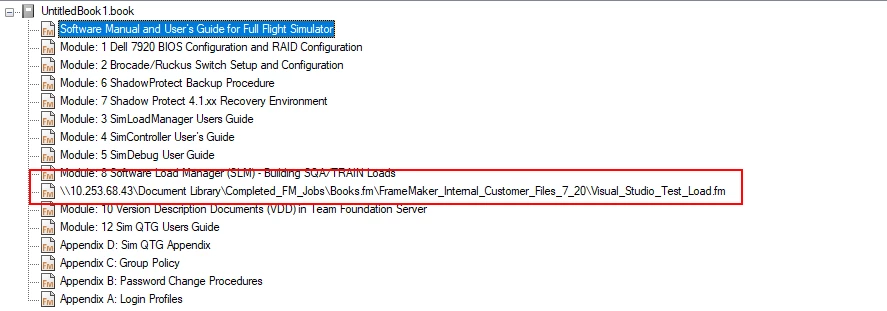
I am making a book and I noticed that all of the files show the heading text for the "chapters" of the book except for one of them. All the chapters have the same paragraph style/heading to start the book chapter but the title in the book view is different. see attached images it is not creating any issues with book creation or cross-references alike but I am wondering if there are any things that I have not checked in the highlighted document that I can look for to make them match.  


This topic has been closed for replies.
Correct answer Winfried Reng

First of all I am not familiar with a MIF wash so I am certain I have not tried that. FM is up to date I have been battling some other issues and have had the application updated as well as Adobe doing some other things to prevent FM from crashing. Yes this seems to be the only file that behaves this way when added to a book and it has been added to three similar but different books thus the post and head-scratching. Thank you for any other tips you can provide.   


Hi Dustin,


For a MIF wash save your file ans MIF, close the original file, open the MIF and save it as FM again.

This cleans the files from any superfluous or inconsistent settings.

Do this MIF wash also for the book file.


You say, that this file was added to other books. Do you have the same issue?

And you get this issue not only on  a single session, but also on the next days?


Best regards


Winfried

1 reply

Community Expert
August 7, 2020

Hi Dustin,


I just tested this myself.

You set the book to show the text of the first paragraph instead of the file name.

Then FrameMaker does not show this text for files on another drive than the book.


Best regards


Winfried

Inspiring
August 7, 2020

Where do you set that? is that done at the document level?  There is only one document in the entire book that does not display properly...


Community Expert
August 10, 2020

Hi Dustin,


At the top right of your book window there is a small icon to switch between the display of the heading text and the file name.

See here:

https://help.adobe.com/en_US/framemaker/using/index.html#t=using-framemaker%2Fuser-guide%2Ffrm_books_bk-books-and-long-documents.html

The icon is number H.

However, you switched between these views anyway. Therefore you know this icon.


I am sorry. I had not noticed your second screenshot with the path and file names. All are in the same folder.

FrameMaker would not be able to show the heading text, when a file is on another drive. That's what I expected, but obviously this is not true.

Then I would recommend a MIF wash.


Questions:

Is FrameMaker up-to-date? Do you have the latest version?

Does this happen only with this file in this book?


Best regards


Winfried