

Participating Frequently
Oct 5, 2022 9:46 PM UTC
Answered

File > Publish > Default.sts

To save a .Book as a pdf. This has worked flawlely for four years, however, something changed yesterday.
I go to File > Publish and the window in blank.
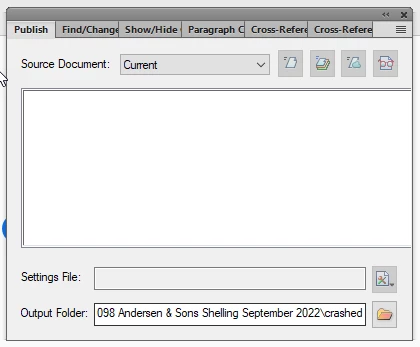
 Settings File: Default.sts is missing. 

    This topic is closed to new replies. Start a new post to keep the conversation going.
    Barb Binder
    Barb BinderCorrect answer
    Community Expert
    Oct 6, 2022 2:28 PM UTC

    Ok, well that's not normal. The next thing I would do is try resetting preferences. Note: if you are using Fm 2020, the folder is called 16.

    https://www.rockymountaintraining.com/adobe-framemaker-resetting-preferences/


    ~Barb

    ~Barb at Rocky Mountain Training

    10 replies

    Barb Binder
    Community Expert
    Community Expert
    Oct 6, 2022 3:17 PM UTC

    @Delkor Tech Pubs:


    Glad to hear it. That was a new one for me. And rebuilding the FrameMaker preferences is similar to a remove and reinstall, just much faster. 


    ~Barb

    Translate
    ~Barb at Rocky Mountain Training
    Barb Binder
    Community Expert
    Community Expert
    Oct 6, 2022 2:49 PM UTC

    Yes.


    That way, if it doesn't solve the problem, you can delete the new "16", and rename "16 Backup" to "16" and you will be right back where you are now. Hopefully, it will work though.


    ~Barb

    Translate
    ~Barb at Rocky Mountain Training
    Barb Binder
    Community Expert
    Barb BinderCommunity ExpertCorrect answer
    Community Expert
    Oct 6, 2022 2:28 PM UTC

    Ok, well that's not normal. The next thing I would do is try resetting preferences. Note: if you are using Fm 2020, the folder is called 16.

    https://www.rockymountaintraining.com/adobe-framemaker-resetting-preferences/


    ~Barb

    Translate
    ~Barb at Rocky Mountain Training
    Participating Frequently
    Oct 6, 2022 2:40 PM UTC

    C:\Users\rbullock\AppData\Roaming\Adobe\FrameMaker\16
    I should change folder '16' to 16 'backup' - correct?

    Translate
    Participating Frequently
    Oct 6, 2022 3:07 PM UTC

    thank you Barb - I'm now able to build a pdf from FrameMaker again 🙂

    Translate
    Barb Binder
    Community Expert
    Community Expert
    Oct 6, 2022 2:08 PM UTC

    Hi @Delkor Tech Pubs:


    Both commands in are the menu on the far right of the Setting's File text box:


    ~Barb

    Translate
    ~Barb at Rocky Mountain Training
    Participating Frequently
    Oct 6, 2022 2:23 PM UTC

    I can accees this window through File > Publish; however, I can change Source Document and Output folder. everything else is not accessable. 

    Translate
    Participating Frequently
    Oct 6, 2022 2:31 PM UTC

    I have the Default.sts file in C:\Program Files\Adobe\Adobe FrameMaker 2020\fminit\Publisher > Default.sts

    Translate
    Barb Binder
    Community Expert
    Community Expert
    Oct 5, 2022 11:11 PM UTC

    Hi @Delkor Tech Pubs:


    There is a New button in the menu on the far right side of the Settings File text box. You can create a new one very quickly.


    Or, you can load the default.sts file by clicking Open from the same menu:

    C:\Program Files\Adobe\Adobe FrameMaker 2020\fminit\Publisher


    ~Barb

    Translate
    ~Barb at Rocky Mountain Training
    Participating Frequently
    Oct 6, 2022 1:03 PM UTC

    where is the Setting File text box? "New button in the menu on the far right side of the Settings File text box"

    Translate
