Inspiring
May 12, 2026
Answered

find/change in "selection" mode

  • May 12, 2026
  • 4 replies
  • 86 views

Hello,

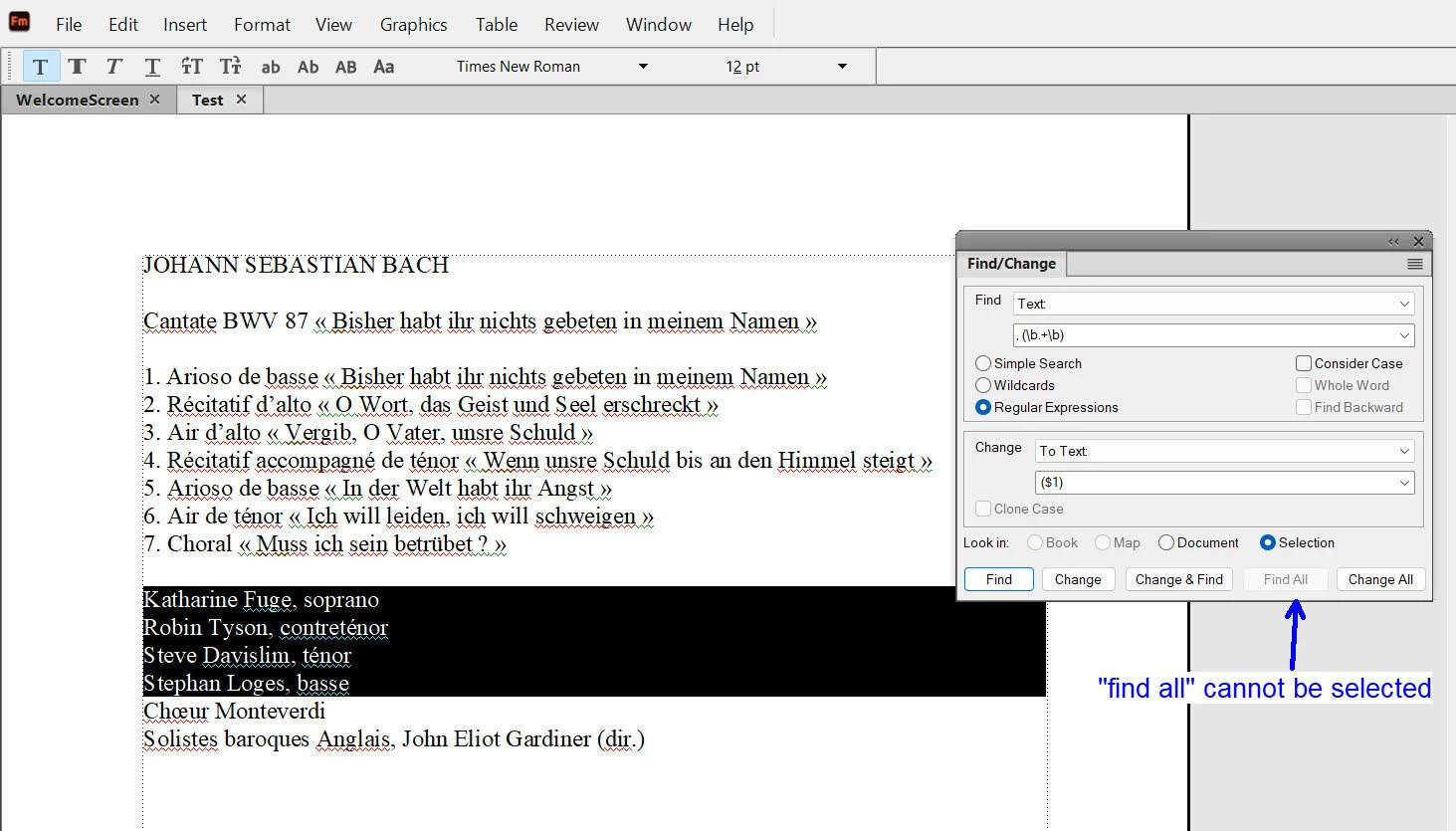
I have selected a part of a document and would like to use a regular expression on all my selection, but in “selection”mode, the “find all” button is greyed so I am unable to “find all” in my selection.


    Correct answer Winfried Reng

    Hi,

    When I select Selection and enter your text in Find and select several paragraphs and click Find, FrameMaker finds only the first occurrence.

    FrameMaker would not move to a second instance.

    Find all is always greyed out, when you select Selection.

    Best regards, Winfried

    4 replies

    Inspiring
    May 29, 2026

    Here is another example :


    About the area surrounded in blue :

    --- actually I do , (\b.+\b)   and  ($1)  in order to create a parenthesis around “alto”, “tenor” and “basse”.

    ---Now, I would like to do the same, but by putting these lines one after the other with a  “comma+ single space” between them, like this :

    Marie Luise Werneburg (soprano), Elvira Bill (alto), Colin Balzer (ténor), Dominik Wörner (basse), Orchestre de la Fondation Bach de Saint-GallRudolf Lutz (dir.)

    In that case, what regular expression you advise me to use ?

    Community Expert
    June 1, 2026

    Hi,

    You can just search for the paragraph mark \p and replace it with a comma and a space.

    You do not need regular expressions.

    Best regards, Winfried

    Inspiring
    June 1, 2026

    Hi Winfried,

    Thank you. In my case, as these lines were some “line breaks”, I have used  \n  (for the line break), so I have this regular expression :

    , (\b.+\b)\n   (for find)

     ($1),            (for change)

    What do you think ?


    Barb Binder
    Community Expert
    Community Expert
    May 28, 2026

    Hi Pierre:

    As you know, Find All is a new feature so perhaps providing feedback to Adobe via Tracker will help shape how it works in the future. 

    In the meantime, you can still apply your REGEX to a selection, you just can’t see what it matches first (which would be handy!).


    ~Barb at Rocky Mountain Training
    Inspiring
    May 28, 2026

    Hi soprano Barb ! ​@Barb Binder 

    Finally, I have decided to choose “document” instead of “selection”, so I see what I do by using “find” then “change”.

    Your regular expression is interesting. I would like to learn how to do regular expressions in FrameMaker. What book do you advise me to use in that case ?

    Barb Binder
    Community Expert
    Community Expert
    May 29, 2026

    Hi Pierre!

    I know I’ve asked you this before, but I have a vague recollection that you are/were an InDesign user?

        I’m asking because to learn REGEX I worked through GREP in InDesign by Peter Kahrel: https://www.amazon.com/GREP-InDesign-InDesignSecrets-Peter-Kahrel/dp/0982508387.

        It’s written for an InDesign user but almost all of it works in FrameMaker too. The book is very well-written and easy to understand. When I was still learning (Ok, I will always still be learning) I actually copied FrameMaker text into InDesign to build and test the expressions, because InDesign has a much more friendly interface, with dropdown menus. I learned the concepts before I memorized the expressions so the menus were invaluable to me. Once I had the queries working, I would copy/paste them into FrameMaker and use them there.

    This is an InDesign recording.


        In FrameMaker, you have to know what to type, there are no assistive menus.

        I did find one other resource that is Frame-specific and helpful: https://blog.adobe.com/en/publish/2016/03/10/framemaker-regular-expressions

        I enjoy the challenge of solving REGEX/GREP questions (though I’m no where near as fast or efficient as others). But if you need a hand, feel free to post an example of what you are trying to do and someone here will be able to help.

    ~Barb

    ~Barb at Rocky Mountain Training
    Winfried RengCommunity ExpertCorrect answer
    Community Expert
    May 18, 2026

    Hi,

    When I select Selection and enter your text in Find and select several paragraphs and click Find, FrameMaker finds only the first occurrence.

    FrameMaker would not move to a second instance.

    Find all is always greyed out, when you select Selection.

    Best regards, Winfried

    Jeff_Coatsworth
    Community Expert
    Community Expert
    May 12, 2026

    I suspect that that “Find & Replace” action doesn’t like working on multiple paragraphs at one time.