



Question
Find disconnected pages
Referring to How to detect disconnected pages:
I have a problem interpreting the term "disconnected page".
- I have a 6 page document
- On page 4 I set Format > Customise Layout > Disconnect Next
- Pages 1 - 4 are in Flow A, same for pages 5 and 6. The two areas ar disconnected:
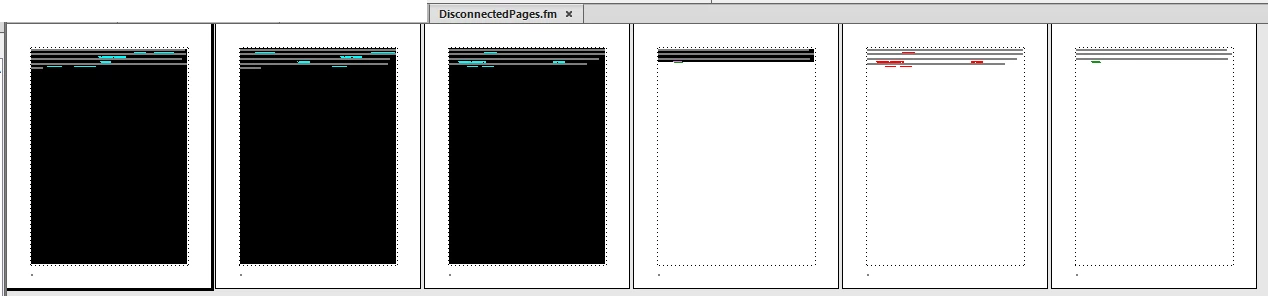
- Now I run a script derived from Rick's (ZIP on my website, script is in subDir Demos )
- It reports pages 1, 2, 3, 4 as disconnected. Yes, they are disconnected from the rest.
► IMHO I do not get a direct information, on which page I have to fix the conncection (4).
What's wrong with my perception?
I have noticed that the ID of the main flow A changes with Disconnection Previous, but not with Disconnection Next:
| No disconnection present: | Disconnection Next applied on page 4: |
| main flow id: 503640075 1 : 503640075 2 : 503640075 3 : 503640075 4 : 503640075 5 : 503640075 6 : 503640075 |
main flow id: 503640075 1 : 503640074 2 : 503640074 3 : 503640074 4 : 503640074 5 : 503640075 6 : 503640075 |
BTW after each Revert to Saved there are new ids!
| No disconnection present: | Disconnection Previous applied on page 4: |
| main flow id: 503406602 1 : 503406602 2 : 503406602 3 : 503406602 4 : 503406602 5 : 503406602 6 : 503406602 |
main flow id: 503406603 1 : 503406602 2 : 503406602 3 : 503406602 5 : 503406603 4 : 503406603 6 : 503406603 |
For this case the script report pages 1, 2, 3 to be disconnected. Notice that the script now finds page 5 before page 4! Hence determination where to fix the disconnection becomes more complicated.


 AdChoices