



Find does not honour parameter textLoc
Dear friends with the sharp eyes and clear thoughts:
I'm puzzled. I have this piece of code (get the full script and the test document from here😞
foundTR = oDoc.Find(tloc, oFindParams); // find footnote anchor (FN ref)
while (foundTR.beg.obj.ObjectValid()) {
oFnTI = oDoc.GetTextForRange (foundTR, Constants.FTI_FnAnchor);
for (k = 0; k < oFnTI.length; k++) { // k always 0 nevertheless loop necessary!
oTL = oFnTI
.obj.TextLoc; // Location of the footnote anchor (beg) $.writeln ("¶ format; FN ref: " + oTL.obj.Name +"; "+ oObject.FnAnchorString);
$.bp(true);
if (CheckXRef (oDoc, oTL, sXRefFmt)) { // is there an XRef prior to FN anchor?
tloc = oTL;
tloc.offset += 2; // behind the FN ref
break; // continue; // already an XRef inserted
} else {
$.writeln("\tNew FN found\n");
}
}
foundTR = oDoc.Find(tloc, oFindParams);
oDoc.TextSelection = foundTR; // DEBUG
}
I have text constructs like this:
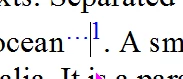
- Left to the cursor is a cross reference to the footnote; right to the cursor is the footnote anchor (FN ref).
- Before I insert the XRef, tloc points to the FN reference.
- After inserting the XRef and applying character format hypertext to the whole construct tloc points after the FN reference.
- It turns out that the Find operation (line 16) does not start at this location but at the old location which of course is now more to the left.
- Hence I'm stuck in a loop with finding the first occurrence of a footnote anchor.
Status of the Data Browser is when I am on line 17 of the above snippet:
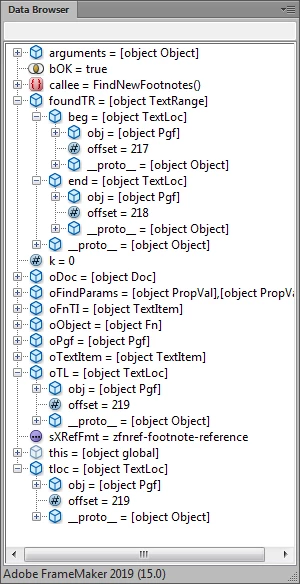
- It can be seen that oTL gets the same offset as tloc (assigning an object just creates an alias), but really cloning the object does not help.
- Replacing break by continue (to run also the useless second iteration of the k-loop) does not have any influence, because oFnTI.length is always 1.
- Nevertheless the k-loop is necessary: oFnTI[0].obj.TextLoc is an invalid object.
- But «what withholds You than to mourn for him? [Shakepeare, Marc Antonys speech on Cesar's funeral] - What withholds Find to work properly here?
- From the FDK documentaition I learn: «FS_FindWrap : A BoolT flag that determines whether the find operation will wrap when it reaches the location where the search began. Default is True; the find operations wraps.» Hence it is useless in my circumstances where I work towards the end of the document.
- Inserting at line 16: $.writeln ("Error " + FA_errno); // -65: FE_BadInsertPos; -41: FE_NotTextObject reports 0.
Wo liegt der hund begraben?


 AdChoices