Participating Frequently
March 2, 2021
Answered

Find in Selection with ExtendScript

  • March 2, 2021
  • 1 reply
  • 719 views

Hi community,


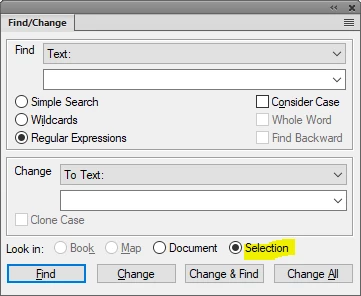
When using FrameMaker Find functionality there is option to Look in Selection.


In ExtendScript documentation there is Find() method for Doc object, which searches in whole document.

Does anyone know a way to Find in Selection (maybe TextRange object) using ExtendScript?


Thanks.

    This topic has been closed for replies.
    Correct answer frameexpert

    It depends on what you want to do once you find the text. Here is a way to just see if the text matches.

    #target framemaker
    
    var doc, regex, textRange, text;
    
    // Get the document object and the selected text range.
    doc = app.ActiveDoc;
    textRange = doc.TextSelection;
    
    // A regular expression of the text I want to find.
    regex = /what I want to find/;
    
    // Get the text of the text range.
    text = getText (textRange, doc);
    
    // See if the text contains the regular expression.
    if (regex.match (text) === true) {
        alert ("I found it!");
    }
    
    function getText (textObj, doc) {
        
        // Gets the text from the text object or text range.
    
        var text = "", textItems, i;
        
        // Get a list of the strings in the text object or text range.
        if (textObj.constructor.name !== "TextRange") {
            textItems = textObj.GetText (Constants.FTI_String);
        } 
        else {
             textItems = doc.GetTextForRange(textObj, Constants.FTI_String);
        }
        // Concatenate the strings.
        for (i = 0; i < textItems.len; i += 1) {
            text += (textItems[i].sdata);
        }
    
        return text; // Return the text
    }

    1 reply

    frameexpert
    Community Expert
    frameexpertCommunity ExpertCorrect answer
    Community Expert
    March 2, 2021

    It depends on what you want to do once you find the text. Here is a way to just see if the text matches.

    #target framemaker
    
    var doc, regex, textRange, text;
    
    // Get the document object and the selected text range.
    doc = app.ActiveDoc;
    textRange = doc.TextSelection;
    
    // A regular expression of the text I want to find.
    regex = /what I want to find/;
    
    // Get the text of the text range.
    text = getText (textRange, doc);
    
    // See if the text contains the regular expression.
    if (regex.match (text) === true) {
        alert ("I found it!");
    }
    
    function getText (textObj, doc) {
        
        // Gets the text from the text object or text range.
    
        var text = "", textItems, i;
        
        // Get a list of the strings in the text object or text range.
        if (textObj.constructor.name !== "TextRange") {
            textItems = textObj.GetText (Constants.FTI_String);
        } 
        else {
             textItems = doc.GetTextForRange(textObj, Constants.FTI_String);
        }
        // Concatenate the strings.
        for (i = 0; i < textItems.len; i += 1) {
            text += (textItems[i].sdata);
        }
    
        return text; // Return the text
    }
    Plutto313Author
    Participating Frequently
    March 3, 2021

    Thank you for answer.
    My goal was to select the found text and then apply a conditional tag to it. The Find() function automatically selects found text. But I think I can use the solution you provided as all I need to do is to select found text. 
    Here is final solution I have used.

    #target framemaker
    
    var doc, regex, textRange, text;
    
    // Get the document object and the selected text range.
    doc = app.ActiveDoc;
    textRange = doc.TextSelection;
    
    // A regular expression of the text I want to find.
    regex = /what I want to find/;
    
    // Get the text of the text range.
    text = getText (textRange, doc);
    
    // See if the text contains the regular expression.
    var foundArray = text.match(regex); // this part was changed from inital solution
    if (foundArray == null) {
        alert ("The regular expression is not found");
    }
    else {
      var foundTextRange = new TextRange();
      foundTextRange.beg.obj = textRange.beg.obj;
      foundTextRange.beg.offset = textRange.beg.offset + foundArray.index;
      foundTextRange.end.obj = textRange.end.obj;
      foundTextRange.end.offset = textRange.beg.offset + foundArray.index + foundArray[0].length;
      
      doc.TextSelection = foundTextRange;
    }
    
    function getText (textObj, doc) {
        
        // Gets the text from the text object or text range.
    
        var text = "", textItems, i;
        
        // Get a list of the strings in the text object or text range.
        if (textObj.constructor.name !== "TextRange") {
            textItems = textObj.GetText (Constants.FTI_String);
        } 
        else {
             textItems = doc.GetTextForRange(textObj, Constants.FTI_String);
        }
        // Concatenate the strings.
        for (i = 0; i < textItems.len; i += 1) {
            text += (textItems[i].sdata);
        }
    
        return text; // Return the text
    }

     
    Thanks.

    frameexpert
    Community Expert
    Community Expert
    March 3, 2021

    OK, but be careful here. Try inserting a marker or some other anchored item in the text range before your found text. You will find that your new text range is off by one character. The getText function only returns the text and the offset that the regular expression match returns does not include any anchored objects that might be in the original text range or text object (paragraph, cell, etc.).


    My solution is to use my code as a first pass to see if there is a match. Then I make a TextLoc object at the beginning of the match and then use Find from that TextLoc to locate the matched text and return the correct TextRange.