


Inspiring
December 18, 2015
Answered

Find & Replace from Paragraph Format 1 to Paragraph Format 2

  • December 18, 2015
  • 2 replies
  • 443 views

Hi All,

In the document that I have received which has two paragraph tags, one Figure Caption 1 and another Figure Caption 2.

Some figure are assigned Figure Caption 1 and some are assigned Figure Caption 2.

How can I find all the Figure Caption 2 and convert them to Figure Caption 1???

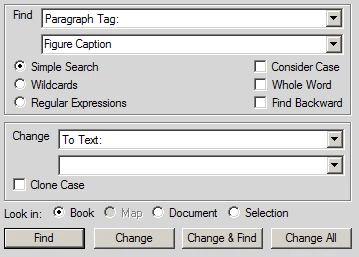
In Find, it has Paragraph Tag: (image below) but in Replace I do not have any adequate option.

Thanks.
    This topic has been closed for replies.
    Correct answer Arnis Gubins

    The first ting that you need to do is to load the clipboard with the "Figure Caption 2" paratag.

    This is done by placing the cursor anywhere in a paragraph that is tagged with "Figure Caption 2". Then from the Edit menu > Copy Special > Paragraph Format to load the clipboard.

    Now, using the Find dialogue, search for the "Figure Caption 1" (all of the text, else it will stop at any Figure Caption paratag). In the Change box, use the "By Pasting" option to apply the desired paratag.

    2 replies

    Legend
    December 30, 2015

    Another option might be to use an ExtendScript that was created for this some time ago:

    http://blogs.adobe.com/techcomm/2011/10/extendscript-of-the-week-change-styles-parachartable.html

    Arnis Gubins
    Arnis GubinsCorrect answer
    Inspiring
    December 19, 2015

    The first ting that you need to do is to load the clipboard with the "Figure Caption 2" paratag.

    This is done by placing the cursor anywhere in a paragraph that is tagged with "Figure Caption 2". Then from the Edit menu > Copy Special > Paragraph Format to load the clipboard.

    Now, using the Find dialogue, search for the "Figure Caption 1" (all of the text, else it will stop at any Figure Caption paratag). In the Change box, use the "By Pasting" option to apply the desired paratag.