
QuintinSeegers
Legend
July 3, 2023
Answered

{first} context rule not applying (FM2022)

  • July 3, 2023
  • 1 reply
  • 193 views

I'm having trouble getting a {first} context rule to work.

In my EDD I have the following rules:

 

When the Heading Element is added to the ActivitySection, I want the following format changes to happen:

1. If it's the Heading in the first ActivitySection in the Activities, the spacing before should be 0pt.

2. If it's not the Heading in the first ActivitySection in the Activities, then check the Level context:

  • If it's Level 1, add spacing before of 27pt.
  • Any other level, add spacing before of 10.5pt

In the Heading Element, I have the following Context Rule:
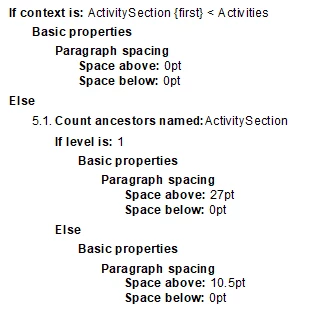
 

When I apply it to my document with the following elements:
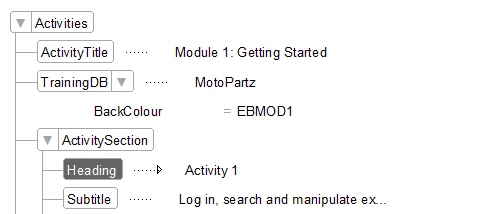
I know the {first} condition checks whether the ActivitySection is the first element within the Activites element. In my case it will never be the first element. I need the rule to apply to the first instance of the ActivitySection within the Activities element. Is there a way to achieve this?

    This topic has been closed for replies.
    Correct answer QuintinSeegers

    I came across this post from 2011 where Lynn A. Price gave one of her usual excellent replies:

    https://community.adobe.com/t5/framemaker-discussions/edd-context-rules-for-a-parent-element-possible/m-p/3613436#M23171

    I changed the context rule to:

    because the first ActivitySection will also appear after either the AcitivytTitle or TrainingDB element, and it works like a charm.

    1 reply

    QuintinSeegers
    QuintinSeegersAuthorCorrect answer
    Legend
    July 3, 2023

    I came across this post from 2011 where Lynn A. Price gave one of her usual excellent replies:

    https://community.adobe.com/t5/framemaker-discussions/edd-context-rules-for-a-parent-element-possible/m-p/3613436#M23171

    I changed the context rule to:

    because the first ActivitySection will also appear after either the AcitivytTitle or TrainingDB element, and it works like a charm.
