
Inspiring
March 7, 2023
Answered

First level header has leader before and after title

  • March 7, 2023
  • 3 replies
  • 1867 views

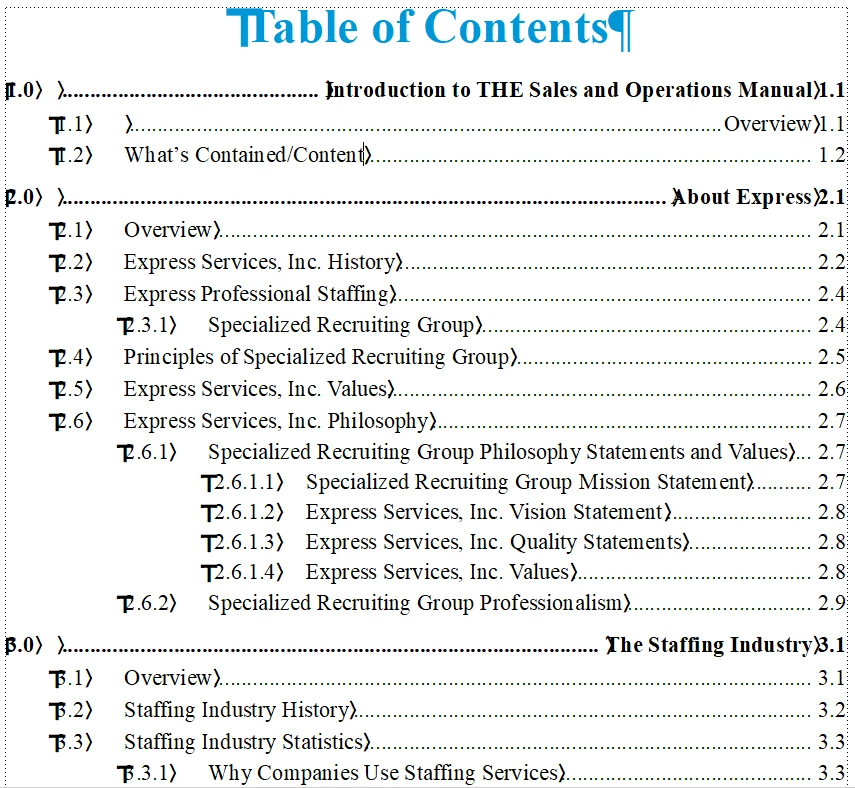
I have a TOC that has leader lines before and after the section title at level 1 (3 sections only) and at level 2 (one section only). I have checked the TOC in the Reference page and the numbering format for each section in the book.


I found no extra spaces in the Reference page section definitions or the section titles in the body of the manual. The selected styles are the same for the good and bad heading in the TOC. I also looked for a possible random charater style in the title lines but nothing there either.


Ideas?


    This topic has been closed for replies.
    Correct answer Winfried Reng

    Nope! I get errors anytime I attempt to attach any approved file extension from the list. Here's my email if you anyone wants to take a look at them.[email removed by moderator - use Private Messaging to swap contact info]


    Just email Direct Message me and I will send them to you.


    Hi Ken,

    Thank you very much for your files.

    In the book files there are tabs before the heading text which you had entered manually. They are not part of automumering. When you search for \t and replace them with a regular character, e.g. m or #, you will see them.

    When you update the book, the heading text is copied into the TOC. As the tabs are part of the heading text, the heading text in the TOC starts with tabs.

    Just search for \t and replace with nothing to fix this issue.

    Best regards, Winfried

    3 replies

    Barb Binder
    Community Expert
    Community Expert
    March 8, 2023

    Hi @defaultcbj1p6qywajq:


    I count a minimum of three tab characters between the number and the heading text. There is a fourth between the text and the page number. Your reference page description—we didn't see the actual reference page—defines two. There are two unaccounted-for tabs on the top level heading line. They are coming from somewhere: either from the reference page definition, or the auto number formatting in the source documents.


    ~Barb

    ~Barb at Rocky Mountain Training
    Inspiring
    March 8, 2023

    I checked the autonumbering in the sections, and all have the same building blocks (format) for Heading1First. I suppose it could be in the reference page. However, why would it effect only the first three Heading1First's in the TOC and not all of them? One definition in the Reference page that applies to Heading1First. Right, so what explains why only the first three Heading1First's and Heading1 (1.1) are impacted and not every Heading1First and Heading1? That would seem to point back to the autonumbering. Maybe I should rebuild the Reference page for each level and see what happens.

    Barb Binder
    Community Expert
    Community Expert
    March 8, 2023

    Hi @defaultcbj1p6qywajq :


    My guess is that two extra tabs are coming from the source files—check the autonumber format for the top level heads in your chapters. Or change the reference page building block from <$paranum> to <$paranumonly>.


    ~Barb

    ~Barb at Rocky Mountain Training
    Inspiring
    March 8, 2023

    Barb, wouldn't it be only one extra tab (with the extra leader), because there are only two tabs in Heading1First in the Paragraph Designer? I checked the autonumber format for the top-level heads (Heading1First). The autonumber building blocks are the same for all Heading1First's, and in this case, that extra tab(s) with the leader is only applied to the first three entries in the TOC and not all of them. Not sure how that's possible. Same paragraph format and autonumber settings for all Heading1First's because it is the same sytle (and Paragraph style variables, including tabs) are applied for all of Heading1First's. I'll try paranumonly. Note that the reference page bulding blocks and the Paragraph style, displayed above, work in one book but not in the other. I checked and the autonumber and paragraph style (variables) and they are all the same for both books.


    I'm leaning towards the paramumonly change and we'll see what happens.

    Community Expert
    March 7, 2023

    This looks like you have an additional tab before the paragraph text building block on your reference page. You would need only one tab or space, but you have an additional tab.

    What's the paragraph format of the level 2 heading? Does it have the same name as the following paragraphs? If no, I think that here is also an additional tab.

    Inspiring
    March 7, 2023

    Thanks, but I don't believe it is an extra tab in the Reference page, because we took a Reference page from a known, good TOC and replaced the one in the TOC that was not formatting properly (See below). Will check for the additional tab, but looking at the building blocks, there doens't seem to be an extract tab.


    <$paranum>\t<$paratext>\t <$chapnum>.<$pagenum> [Heading1First]
         <$paranum>\t<$paratext>\t <$chapnum>.<$pagenum> [Heading1]
              <$paranum>\t<$paratext>\t <$chapnum>.<$pagenum>  [Heading2]
                   <$paranum>\t<$paratext>\t <$chapnum>.<$pagenum> [Heading3]

                        <$paranum>\t<$paratext>\t <$chapnum>.<$pagenum> [Heading4]

    Community Expert
    March 8, 2023

    Hi, @defaultcbj1p6qywajq ,

    there are at least 3 tabs defined in that bad line between the number and the text block.

    You have to check the paragraph format, the paranum format, the reference page entry, etc.


    If possible I would ask to give access to the originasl TOC file, so we can have a look at it.


    Regards

    Stephan