


Participant
Nov 9, 2019 7:43 PM UTC
Question

Fixing text outside of text box?

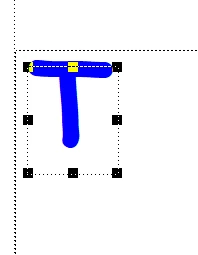
This may be a noobish question, so appologies in advance if this has been asked before (I couldn't find anything online similar). I'm trying to create a text box within an anchored frame, and I don't understand why the top of the text is partially beyond the borders of the text box (see attached below - the top of the "T" is outside of the text box). Is this standard FrameMaker behaviour or is there a way to correct this? 
 

Any advice is much appreciated!


This topic is closed to new replies. Start a new post to keep the conversation going.

2 replies

Bob_Niland
Community Expert
Community Expert
Nov 10, 2019 8:56 PM UTC

It's the font. Just arbitrarily testing, MS Comic Sans (which that appears to be) and Arial do that. Times New Roman just touches the edge. Courier New is a bit below the edge. A number of work-arounds might be applied, depending on the usage model.

Translate
frameexpert
Community Expert
Community Expert
Nov 9, 2019 8:15 PM UTC

This is likely a function of the particular font and its internal bounding box. If you try other fonts, you will see that their position within the text box varies.

Translate
www.frameexpert.com