


MR89
Inspiring
October 6, 2017
Answered

Flow of text to new page

  • October 6, 2017
  • 3 replies
  • 1799 views

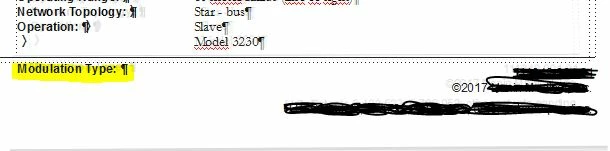
I have a 4-column template that I am working in; the text runs off the bottom of the last column, but does not start a new page or run to the next page.  It disappears into the footer, although I know it's still there.  There is a second page below it with the same 4-column format.  I can see the text "Modulation Type" continuing below the footer before the rest disappears.  I tried placing the cursor at the end of the paragraph and selecting "Top of Page", and also tried Special->Page Break and selecting the "At Top of Next Available" option, but nothing has worked.  I'm sure I don't have something set up correctly.  The image below is displays the bottom of the 4th column of the first sheet.  The text scribbled out is just sensitive information in the footer:
This topic has been closed for replies.
Correct answer Barb Binder

It's very hard to tell from the cropped screen shot, but it looks like there are two template frames there, overlapping. You only need one, and one you are using needs the same flow tag as the previous and next pages, and Auto-Connect should be on.

Or, is that text in a table? Cells can't break across pages so that would cause the same result. Or in an anchored frame? Really, just guessing until you share a full page screen shot with the Status Bar visible.

3 replies

Barb Binder
Community Expert
Barb BinderCommunity ExpertCorrect answer
Community Expert
October 6, 2017

It's very hard to tell from the cropped screen shot, but it looks like there are two template frames there, overlapping. You only need one, and one you are using needs the same flow tag as the previous and next pages, and Auto-Connect should be on.

Or, is that text in a table? Cells can't break across pages so that would cause the same result. Or in an anchored frame? Really, just guessing until you share a full page screen shot with the Status Bar visible.

~Barb at Rocky Mountain Training
MR89
MR89Author
Inspiring
October 6, 2017

The text was in a text frame only, but you were correct, there was an unnecessary frame.  I deleted that frame, then used the Format->Customize Layout->Connect Text Frames to get the flow to continue to the next page.  I'm somewhat familiar with Framemaker, but I'm having to refine my knowledge since I started full-time in the program.

Thanks for your help Barb!

Barb Binder
Community Expert
Community Expert
October 6, 2017

Always happy to help. Glad it was that easy.

~Barb at Rocky Mountain Training
