
QuintinSeegers
Legend
August 18, 2020
Answered

Flow tag error when importing formats - FM2019

  • August 18, 2020
  • 1 reply
  • 302 views

We have a FM document set up with all our Master and Reference Pages set up. We then import these layouts into our documents. We've recently started getting the following issue:

Whenever we update the TOC, the master pages revert to some completely random layout.

When we re-import the formats from our template, we get the following error:
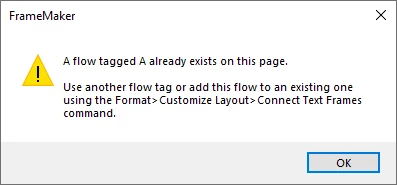
When we check the Master pages on the desitnation document, the master pages were imported correctly.


Edit: We've tracked it down to strange behaviour related to an Object Style we use for inserted graphics. Not sure how that relates to mater page layouts, though.


    This topic has been closed for replies.
    Correct answer QuintinSeegers

    Looks like it definately was to do with some Object Styles.We had one that we used to use when inserting graphics (actually calling it 'graphics'. When we updated the TOC, it appears to apply this graphic Object Style to all the text frames on the master pages and messing up the master pages.

    As we no longer use the Object Styles (they weren't really working for us as the parameters varied too much with each instance), I've deleted the Object Style from both the source and all the destination documents and the issue has disappeared.

    Not sure if it's related to FM2019 as we didn't have this issue in FM2017. Just glad It was an easy fix 🙂

    1 reply

    Bob_Niland
    Community Expert
    Community Expert
    August 19, 2020

    The generate TOC context might make a difference, but that error is usually due to manually created disconnected text frames that had Flow Tag A assigned (probably unintentionally).

    Does the TOC contain content relying on that Style?
    What is the leading content before the generated content?

    QuintinSeegers
    QuintinSeegersAuthorCorrect answer
    Legend
    August 19, 2020

    Looks like it definately was to do with some Object Styles.We had one that we used to use when inserting graphics (actually calling it 'graphics'. When we updated the TOC, it appears to apply this graphic Object Style to all the text frames on the master pages and messing up the master pages.

    As we no longer use the Object Styles (they weren't really working for us as the parameters varied too much with each instance), I've deleted the Object Style from both the source and all the destination documents and the issue has disappeared.

    Not sure if it's related to FM2019 as we didn't have this issue in FM2017. Just glad It was an easy fix 🙂