



K.Daube
Community Expert
Community Expert
February 4, 2015
Question

FM-12.0.4.445 Online Help is sowmewhat screwed up

  • February 4, 2015
  • 4 replies
  • 857 views

FM-12.0.4.445 Online Help is sowmewhat screwed up:
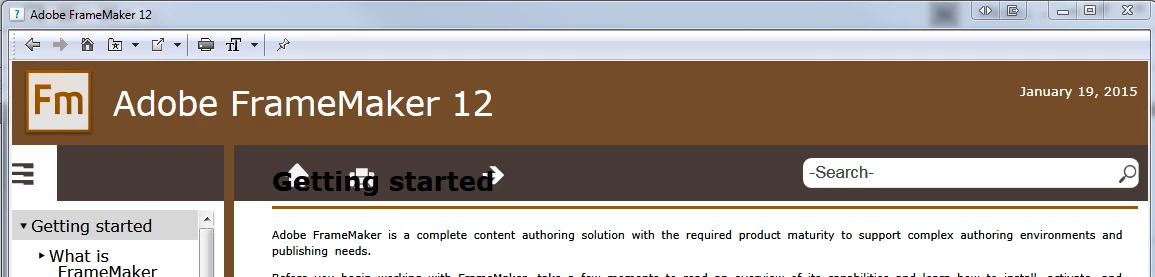
The top of the text overlaps with the heading stuff.

If you close the left TOC pane with the left pointing triangle in the middle of the hight, ther is no means to get the TOC pane back:
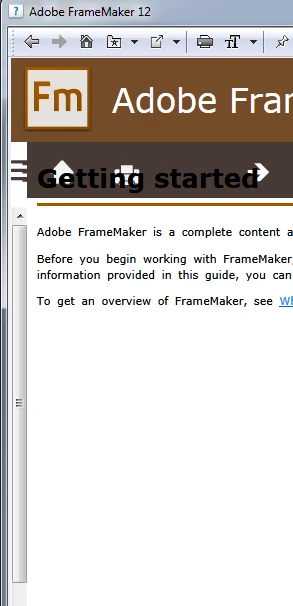
I need to close the help application. At the next start (and suficient width) the left TOC pane is available again.

    This topic has been closed for replies.

    4 replies

    K.Daube
    Community Expert
    K.DaubeCommunity ExpertAuthor
    Community Expert
    February 12, 2015

    On 11 Feb 2015 at 19:54, Vivek Kumar - Bug Discussions wrote:

    > Hi Klaus,

    > We have fixed the CSS online. Thanks for letting us know about it.

    I have tested - it's OK now.

    Known Participant
    February 12, 2015

    It was nice of them to fix it,

    but don't Adobe bother to test these things before releasing them anymore?

    It seems that more and more of us are trying features or content for the first time, and finding they don't actually work.

    K.Daube
    Community Expert
    K.DaubeCommunity ExpertAuthor
    Community Expert
    February 9, 2015

    To Mike-Hardy

    I have applied your correction to FM-12 $HOME\fminit\Publisher\ResponsiveHelpExt\widgets\common\styles\layoutfix.min.css

    But the Help still does not behave.

    Sice this help is online-help the files are taken from the web and hence my local css is not taken into account. Adobe needs to fix this.

    Klaus

    Known Participant
    February 6, 2015

    I wish they'd just give us the printed user guide back

    The current help format is terrible. It's like it was designed to be used on a mobile phone.

    It's not even as good as the kind of help you used to get in Windows 3.1 /sighs/

    Legend
    February 6, 2015

    My FM 7.0 User Guide is right here on my desk … even if, sign of the times, the front cover finally parted company with the rest of the book when I reached for the DITA Style Guide next to it :-} I also have a printed Bookmaster guide, but that's in a bookcase and rarely consulted.

    Jeff_Coatsworth
    Community Expert
    Community Expert
    February 4, 2015

    Yes, that looks messed up – try to recover the ToC by clicking on the “stacked lines” on the left side of the page.

    K.Daube
    Community Expert
    K.DaubeCommunity ExpertAuthor
    Community Expert
    February 5, 2015

    Jeff,

    It seems that the whole (dark brown) upper area is inactive:

    - Nothing can be entered in the Search field

    - Non of the HOme, Print, Left, Right buttons can be clicked

    - the TOC icon top left can not be clicked

    Participating Frequently
    February 5, 2015

    There is a bad setting in one of Adobe's CSS files. This is making the contentholder div overlay the desktop_functionholder div.

    In layoutfix.min.css, this bit:

    div.content div.contentholder{
        position:absolute;
        top:0.1em;
        left:0.1em;
        right:0.1em;
        bottom:0.1em;
    }

    should instead be:

    div.content div.contentholder{
        position:absolute;
        top:3.1em;
        left:0.1em;
        right:0.1em;
        bottom:0.1em;
    }

    (i.e. top needs to be 3.1 em, not 0.1 em).

    It's up to Adobe to fix this.