


Question
FM 12 How to Customize Output for HTML 5
Hi, in FM 12, how do I Customize Output for HTML 5?
With the Publish dock open, and having already generated output, I see that one of my FM styles has been given a 144pt left position in the CSS. While this mirrors what the FM style is like, I want to edit that to be 0 in my HTML 5 output.
So, I:
- Right-click Responsive HTML5 in the Publish window.
- Choose Edit Settings.
- Click the Style Mapping tag.
- Expand the Paragraph list.
- Select the style I want to modify (in this case, GlossaryDefinition).
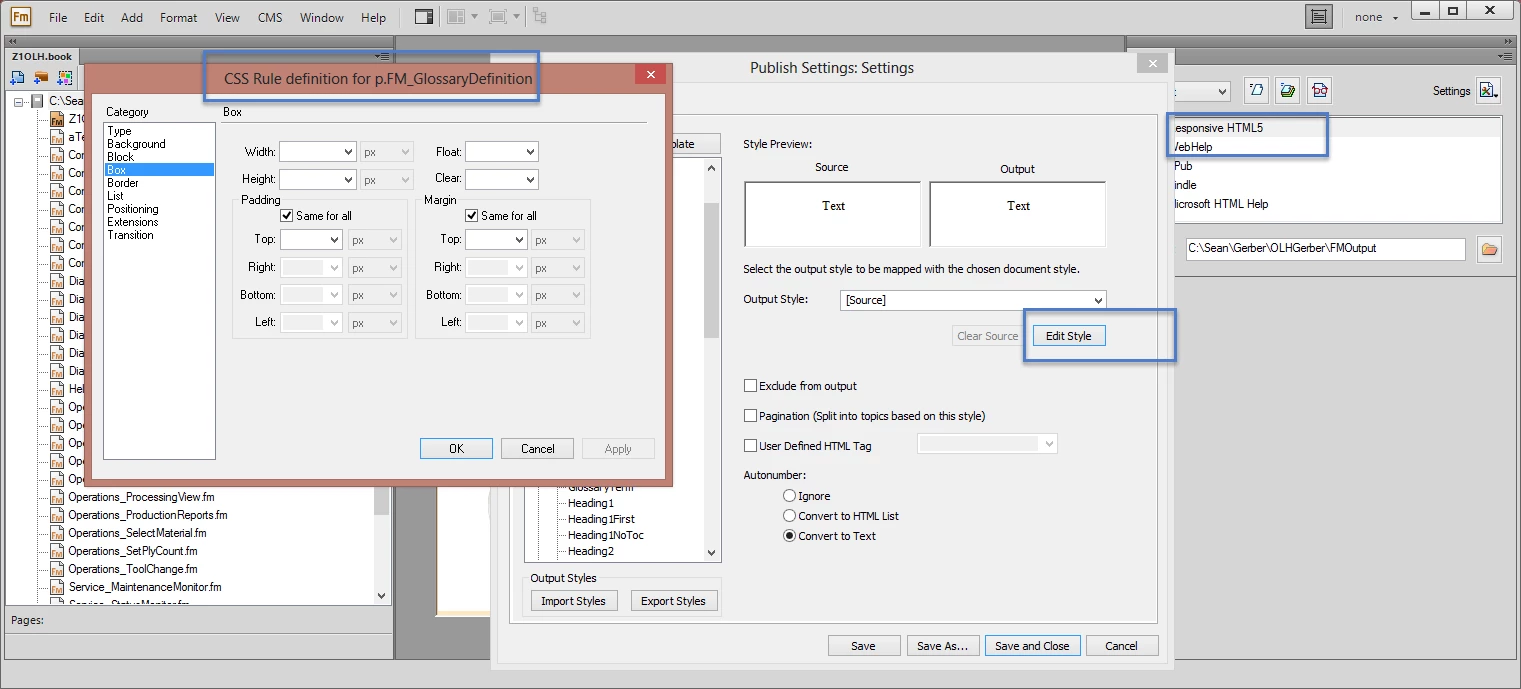
- Click Edit Style. The CSS Rule definition for p.FM_GlossaryDefinition dialog box opens.
The problem at this point is that the 144pt indent, that I can see in the HTML source, is not evident in the p.FM_GlossaryDefinition dialog box. Now, I know I can edit a CSS somewhere, but expect it will be overwritten each time I generate.
So, why doesn't the p.FM_GlossaryDefinition dialog box have settings that reflect what I see in my output?
Thanks,
Sean
 AdChoices