



FM-14: Custom icons not accepted
There are severe problems to customise FM-14: Either code has been messed up or the technique has completely changed without documenting it.
This all has worked perfectly in FM-13. See my website.
For tests I change temporarily the files in %appdata%\Adobe\FrameMaker\14\ (user area)
In WorkSpaces\UnStructured\WYSIWYGView\toolbars\table_format.xml :
from
<images base="S_ADDCOLS"/>
to
        <ACTION command="AddColumnsToRight" tooltip="Add Column to Right">
            <images base="etb_ADDCOLS"/>
        </ACTION>
In the user area I have these icon files extracted (and renamed) from fmcustom.dll:
   etb_ADDCOLS_SM_N.png
   etb_ADDCOLS_SM_N_2X.png
   etb_ADDCOLS_SM_N_3TO2X.png
   etb_ADDCOLS_SM_N_D.png
   etb_ADDCOLS_SM_N_D_2X.png
   etb_ADDCOLS_SM_N_D_3TO2X.png
The result is disgusting:
The button does not appear in the toolbar and for the (in the tool bar) following buttons the function and icon are out of sync:
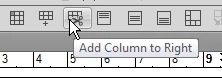
The function is that of the missing icon and this is what the tool tip displays!
If have tried all sorts of naming for the custom icon file. Nothing works (the first is in subdir etb_icons):
<images base="etb_icons\table_col_add"/>
<images base="etb_ADDCOLS"/>
<images base="ETBADDCOLS"/>
What the heck is going on here?


 AdChoices