
smathers
Known Participant
May 2, 2017
Question

FM 2017 Patch 1 internal error message - keeps crashing

  • May 2, 2017
  • 4 replies
  • 699 views

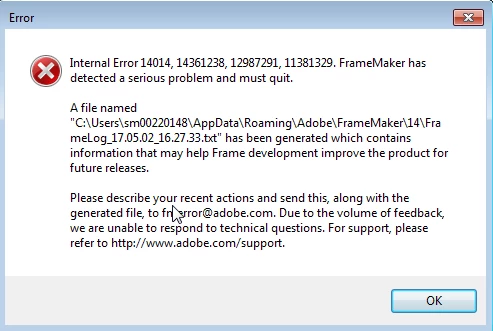
This is the error message I am getting and I don't even think I can work now as it keeps crashing---can someone help me ASAP pls? I am on deadline:
[Message was branched by moderator]

    This topic has been closed for replies.

    4 replies

    Participant
    January 14, 2019

    I also have the same problem when I try to "Save as reviewe PDF". I renamed 14 to 14-old but it still occur the same problem on new 14 folder. Anybody help me?

    Participant
    January 14, 2019

    thank God, after I restart my PC, the problem was resolved

    smathers
    smathersAuthor
    Known Participant
    May 4, 2017

    My issue is now fixed---Ajit did an awesome job in helping me, and has been so very helpful for all issues I have had---thank you!!! Renaming the 14 to 14_old worked great for anyone else experiencing this issue!

    Viku
    Adobe Employee
    Adobe Employee
    May 3, 2017

    Hi Smathers,

    I have sent you a private message with my email address. Kindly email me your contact details. We will get back to you.

    Regards

    Viku

    Adobe Systems

    Matt-Tech Comm Tools
    Community Expert
    Community Expert
    May 3, 2017

    Hi smathers,

    You may find that if you rename the 14 directory listed in the error log (for example, rename it to 14-old) and restart FrameMaker, you should be all set.

    NOTE: When you restart, any customizations you've made to FrameMaker will be reset to defaults. You can still access things like workspaces, etc. in your renamed 14-old directory. Just move the assets from the 14-old back to the 14 directory.

    -Matt Sullivan, FrameMaker Course Creator, Author, Trainer, Consultant