Participant
February 22, 2010
Answered

Fm 9 changing template variable data as required

  • February 22, 2010
  • 2 replies
  • 412 views

I have a template file but I need to change some variable values and I don't know how to accomplish that. What am I missing?

    This topic has been closed for replies.
    Correct answer Arnis Gubins

    The Volume Number variable is defined at the book level for each file in the book. Use the "Numbering" option for the selected file(s) set via this panel:
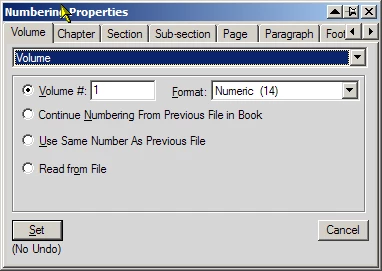
    There is also some more help here: http://help.adobe.com/en_US/FrameMaker/9.0/Using/WSd817046a44e105e21e63e3d11ab7f7960b-7ec2.html

    2 replies

    crhilamanAuthor
    Participant
    February 23, 2010

    I have a variable "Volume Number" defined as 00<$volnum>

    Volnum is currently set to "35". How do I change that value to "02"?

    Arnis Gubins
    Arnis GubinsCorrect answer
    Inspiring
    February 23, 2010

    The Volume Number variable is defined at the book level for each file in the book. Use the "Numbering" option for the selected file(s) set via this panel:

    There is also some more help here: http://help.adobe.com/en_US/FrameMaker/9.0/Using/WSd817046a44e105e21e63e3d11ab7f7960b-7ec2.html

    Arnis Gubins
    Inspiring
    February 23, 2010

    In the Variables POD (or use Special > Variables) select the variable to be changed. Then click on the edit button as shown in this screen cap:

    This will then open the edit panel in the docking area on the right side:

    Then edit the Definition entry to insert what you need.