smathers
Known Participant
June 6, 2011
Answered

FM10 is limiting my use---can't Use / slash in Variables Anymore..???!!!

  • June 6, 2011
  • 2 replies
  • 896 views

Hi, I have been using FM for 15+ years and have always LOVED it, and make all my clients buy it---now I am trying out the new FM 10 & it seems to now limit all the stuff I used to EASILY be able to do, I am so disappointed! Maybe someone has workarounds for the following? Pls help!

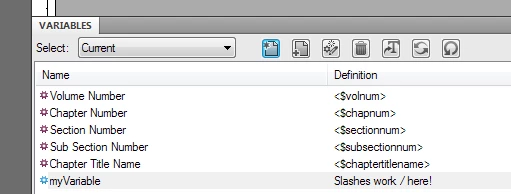
  • I use a "Title" variable in all my docs that displays on my cover and all headers, and I used to be able to add the / (slash) character---now it won't display? Oh noooo!!! Why not? Help!
  • My F8 key no longer reverts the text back to default---I use this constantly all day, as I am converting tons of docs into FM and sometimes applying the style doesn't take until I select the text and press F8---what happened?! How do I get this feature back?
  • I loved having all the tabs of my files display so I could easily click from one file to another---now they are all hidden, the windows come in all jacked up and I have to constantly re-size them so I can see my menu & icon bars and the items that display on the right of my screen, and now I have to go to the Window>Documents menu to find the file I need---this whole thing is taking me more time now to do my docs, so bummed! Can I get the file to open like it used to and fit perfectly within the screen? Don't like this at all, very awkward.
  • Variables---I use several variables in one file, and before all I had to do was double-click the variable, type the text, and then press Enter----now I have to double-click, and do the extra step of clicking Edit, and then do the rest---why the extra step now? Yuck! Why can't I just do a simple double-click like before?

Is there any way I can revert back to the older interface, or can someone tell me how to get these things back to normal, help!

Bummed-out FM User

    This topic has been closed for replies.
    Correct answer Arnis Gubins

    1. The "/" character works just fine on several different FM10 installations (Win7 64-bit and XP) here.

    What platform are you on?

    2. Have you customized your keyboard commands somehow? The F8 function key has always applied the character format by using a type-ahead feature for the Character tag name. To get it to apply the Default ¶ Font, press F8 and "d" and then hit the enter key.

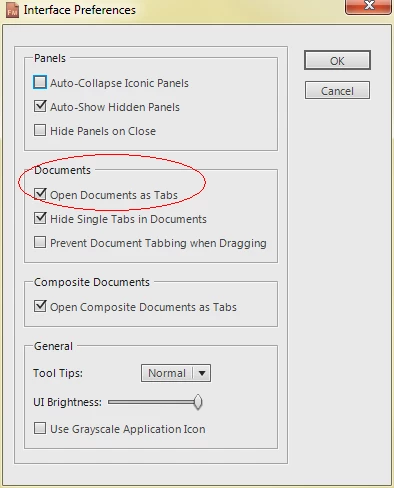
    3. To get the documents to display in tabs, you must set the Interface Preferences (File > Preferrences > Interface) to open the documents in tabbed windows:

    4. Variables - with the new interface, double-clicking on a variable highlights it in the Pod window. If you only have several variables to edit in a file, it's quite quick to select them in the Pod window instead and click on the edit button. Unfortunately, no workarounds - it's the way it now works.

    My intial reaction to the new interface (using FM since '92) was also negative. However after learning all of the customizations and being able to configure the workspaces for the various different tasks in document production, I find it much more productive and efficient (bugs not withstanding). You might want to watch the "Getting started with the new FrameMaker 9 User Interface" video at:

    http://tv.adobe.com/watch/tips-and-tricks-for-technical-communicators-to-maximize-productivity/getting-started-with-the-new-framemaker-9-user-interface/

    2 replies

    Arnis Gubins
    Arnis GubinsCorrect answer
    Inspiring
    June 7, 2011

    1. The "/" character works just fine on several different FM10 installations (Win7 64-bit and XP) here.

    What platform are you on?

    2. Have you customized your keyboard commands somehow? The F8 function key has always applied the character format by using a type-ahead feature for the Character tag name. To get it to apply the Default ¶ Font, press F8 and "d" and then hit the enter key.

    3. To get the documents to display in tabs, you must set the Interface Preferences (File > Preferrences > Interface) to open the documents in tabbed windows:

    4. Variables - with the new interface, double-clicking on a variable highlights it in the Pod window. If you only have several variables to edit in a file, it's quite quick to select them in the Pod window instead and click on the edit button. Unfortunately, no workarounds - it's the way it now works.

    My intial reaction to the new interface (using FM since '92) was also negative. However after learning all of the customizations and being able to configure the workspaces for the various different tasks in document production, I find it much more productive and efficient (bugs not withstanding). You might want to watch the "Getting started with the new FrameMaker 9 User Interface" video at:

    http://tv.adobe.com/watch/tips-and-tricks-for-technical-communicators-to-maximize-productivity/getting-started-with-the-new-framemaker-9-user-interface/

    smathers
    smathersAuthor
    Known Participant
    June 7, 2011

    Thank you! I have Windows 7. See below:

    • The F8+d+Enter works, but a shame since I used to have to only press F8+Enter (nope, didn't change anything about my F keys). Just seems like there are extra steps to the new interface.
    • My F9 doesn't work as well to apply styles anymore either, it only works half the time and the other half gives me a"Not Applicable" message at the bottom. Another shortcut gone!
    • I chose the tab thing that you specified below & it is working now, but I did use that the other day and it didn't work, and also didn't remain chosen as it was unchecked today when I went in. It seems all the items I set up in my Preferences reset each time I close FM10 down. When I re-open I have to reset it again---any way of getting the interface to save settings upon exit?
    • The Variables Pod is pretty good when it remains open at the bottom of my page, but when I close it, it never opens again and then makes me do several clicks just to update one variable. I guess I just need to keep playing around with this! Just hard when I am wroking and need to get docs out quickly!

    Thanks for the tutorial link. I think I need to find the FM10 ones tho and will check it out to see if I can get more familiar with it!

    I really appreciate your feedback, thanks so much!!!

    Jeff_Coatsworth
    Community Expert
    Community Expert
    June 7, 2011

    Try saving your workspace (top right corner) after setting it up the way you like.

    Bob_Niland
    Community Expert
    Community Expert
    June 7, 2011

    I don't have FM10, and can't try this.

    Can you "escape" the "/" by using "\/"? (backslash forward slash)

    If not, can you use the x### hex code for that character? (don't have reference handy)

    smathers
    smathersAuthor
    Known Participant
    June 7, 2011

    The \/ worked for the slash, thank you so much! Anyone else can help with the other items...?