


Participating Frequently
February 27, 2014
Question

FM11 crashes when I try to open a file from a book

  • February 27, 2014
  • 2 replies
  • 759 views

Hi,

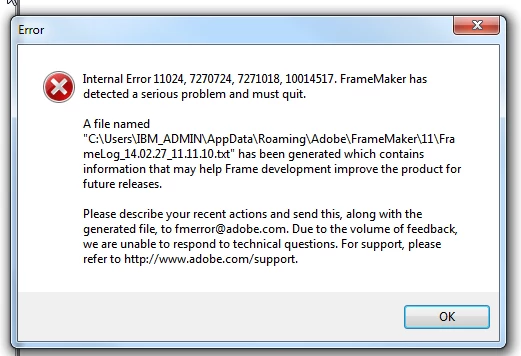
I have been using framemaker 11 all these days. From yesterday , I have a strange issue. FrameMaker 11 crashes every time I open a file from a book.

I have attached the screenshot of the error I get.

Can anyone help  me as to what could be the issue.
    This topic has been closed for replies.

    2 replies

    Arnis Gubins
    Inspiring
    February 27, 2014

    @Meera,

    Check the consfile.txt found in the same location as the FM crash log. This may provide a clue as to what happened.

    Can you open the files in the book directly from FM? Are there any warning or error messages? Are they older versions of FM files?

    Try creating a new FM book file.

    Participant
    February 27, 2014

    I have the same problem periodically. Have you looked at the file referenced?

    My header infor reads:

    === Header Begin ===

    Internal Error: 11004, 21860591, 20722943, 20723475

    FrameMaker 11.0.0 for Intel

    Build: 11.0.0.380

    Window System: MSWindows

    Operating System: Windows NT 6.1 (major.minor.build: 6.1.7601 Service Pack 1)

    Generated on: Wednesday, January 15, 2014 4:09:20 PM

    To file: C:\Users\joe\AppData\Roaming\Adobe\FrameMaker\11\FrameLog_14.01.15_16.09.20_2.txt

    === Header End ===

    I'm not sure what's up with the Operating System line in this file. I have Win 7 SP 1.

    I wonder if you have the same Internal Error, Frame and Build Number? Have you updated your Adobe Apps recenty to the latest and greatest? I have not. Our IT team locks us out from updating. If you have the same build, try updating Frame.

    I seem to get the error more often when I work files on networked drives. I experience it less when I work locally on the local hard drive.

    Hope this helps.

    Jeff_Coatsworth
    Community Expert
    Community Expert
    February 27, 2014

    @ConnJoe - The error file only makes sense to Adobe engineers, not us mere mortals ;>)

    @MeeraPRV – are you doing anything in particular when the crash occurs? Does it happen with any other books? Can you open all the component files of the book without any errors (assuming you haven’t turned off the warning console)?