Two-fer
Inspiring
February 26, 2015
Answered

FM12--"Update Book" Causes Cross-Reference Font Size Issues.

  • February 26, 2015
  • 1 reply
  • 648 views

FM Version: 12.0.4.445

Windows 7 Pro.

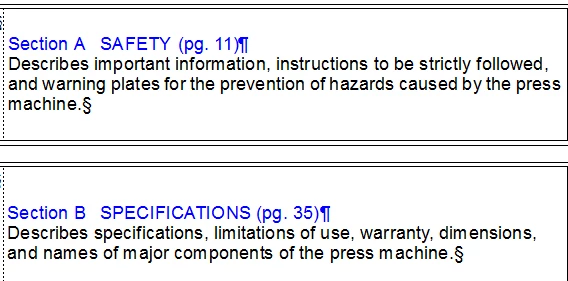
Here is what the cross-references are supposed to look like:

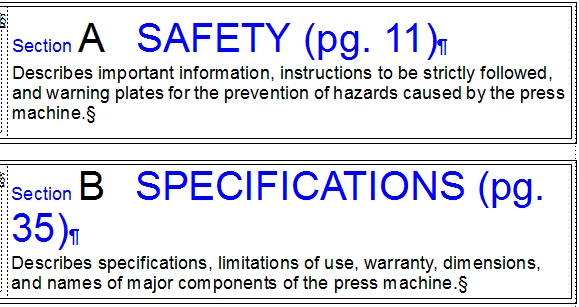
Here is what it looks like after I run 'Update Book':

I can remedy this by running 'Update References' for the individual file.

Is this a Reference page issue? A bug? A wacky feature?

Thanks!

Louis

    This topic has been closed for replies.
    Correct answer Arnis Gubins

    I tried <$paranumonly> and it made no difference.

    Whenever I update the book the text in the x-ref still gets large.

    The 'A' 'B' etc., are just text with a character format for 24-point font. The text ("Section A Safety") is also being read for the automatic headers on each page, but the headers are not exhibiting this font wackiness.

    For fun, I changed the 'A' to 'Default Font' (11-pt. font) and the problem went away for that one x-ref when I updated the book, so it must be related to the character format.


    So what is the <$paranum> in your x-ref format referencing?

    Anyway, I just tested this scenario with a document in a book and the same document as a standalone. You are correct, it is a funky error when the update is done from the book. The character tag is being picked up in the <$paratext> building block and cascades through the rest of the paragraph content.

    Please report this as a bug via: https://bugbase.adobe.com/index.cfm

    1 reply

    Arnis Gubins
    Inspiring
    February 26, 2015

    What does the x-ref format look like, i.e. how is the formatting applied to the x-ref? Did you apply the formatting as part of the x-ref definition or did you apply a character format to the x-ref entry after the fact?

    Two-fer
    Two-ferAuthor
    Inspiring
    February 26, 2015

    Here is the x-reference: <Blue><$paranum><$paratext> (pg. <$pagenum>)

    No character tag is highlighted in the Character Catalog when I click on the x-ref text.

    However, if I click on 'Default Font' in the Character Catalog it does go back to normal.

    FWIW, I used this same file in FM10 for years and never saw this problem.

    Two-fer
    Two-ferAuthor
    Inspiring
    February 26, 2015

    In the x-ref source, the 'A' does have a character format applied to it:

    Maybe this is getting picked up somehow???