
April 3, 2019
Answered

FM17 Opening .book files prompts internal error, but can open .fm files in that book

  • April 3, 2019
  • 2 replies
  • 1159 views

Hey All--my machine suddenly began to have this issue: I cannot open .book files in FM 2017 (with the latest updates installed), but have no problem opening the .fm files in that book. When I attempt to open a .book file, the program begins to open, then almost immediately stops responding, and then throws an internal error message and has to close. I can't open any .book files, nor can I open a new .book file.
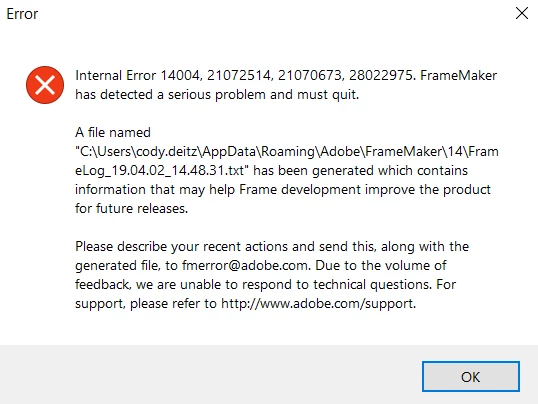
And it gets more interesting: I can push the apparently un-openable files to our central repository and my colleague is able to pull and open up the .book files that I cannot.

I have yet to contact adobe support as I'm hoping there's a simple fix that I'm missing, but looking up the error codes yielded nothing.

So--any ideas? I'm a little stumped.

This topic has been closed for replies.
Correct answer Jeff_Coatsworth

Hmm, in that case I'd first try renaming your FM's AppData\Roaming\Adobe\Framemaker\version folder & firing FM back up again

2 replies

Participant
October 7, 2021

Simply delete the recent meta.txt, .cache, .ini, .txt, Temp, files (those created on the day the problem began; see example files below in blue) from your FrameMaker's AppData\Roaming\Adobe\Framemaker\version folder and then restarting FrameMaker.


Jeff_Coatsworth
Community Expert
Community Expert
April 3, 2019

The fact that someone else can open the same book that you're having a problem with indicates that something's different on your machine. What's changed? Can you create a new book with the same files in it as the "bad" book and have that work?

April 3, 2019

Yeah--it's definitely an issue with my machine, but I haven't changed anything and there've been no system patches as far as I can determine.

I attempted to create a new book and copy the files into it, but even opening a new book caused the same crash. I can't open any book files; it's not just the one book.

Jeff_Coatsworth
Community Expert
Jeff_CoatsworthCommunity ExpertCorrect answer
Community Expert
April 3, 2019

Hmm, in that case I'd first try renaming your FM's AppData\Roaming\Adobe\Framemaker\version folder & firing FM back up again