



Question
FM2015: Resp. HTML5: Sidebar image resizes incorrectly
In the Layout Customization window:
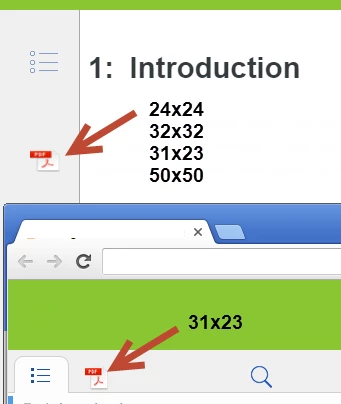
- I select "Sidebar (Desktop)" in the Layout Components, then change the Index tab image to a 31x23 pdf icon (this is the recommended size according to the field help). When I publish, this appears correctly.
- I select "Sidebar (Tablet)" in the Layout Components section. The field help for the Index tab image indicates max size 50px x 50 px, and smaller sizes will always fit.
I have tried this with original icons downloaded from Adobe: 24x24, 32x32, and with the 'white space' around the 24x24 icon adjusted to 31x23 and 50x50.
No matter what I choose, the image gets stretched horizontally.
Question: Can somebody tell me what is causing this to happen / how to display the icon in its correct proportions? (Image below shows Tablet first (image stretched) followed by Desktop (image correct).
Thanks!
 AdChoices